NodeJS - Concept
Node.js is an open-source and cross platform javascript runtime environment. It is a popular tool for almost any kind of project! NodeJS is javascript on the server, built from v8 engine used to read, parse javascript code and executed necessary action. NodeJs i a non blocking event based IO and run on a single thread process. Event loop is constanly running process that monitors the callback queue and the call stack. The process will continously check the call stack, and if the call stack is empty, push the next function from the callback queue to the stack. If there is nothing in the callback queue, nothing will happen.
- Runs the V8 javascript engine, the core of Google Chrome, outside of browser. This allows Node.js to be very performant
- Single thread for every request
- provides a set of asynchronous I/O primitives
- using non-blocking paradigms, making blocking behaviour the exception rather than the norm.
- Reading network, database, file system: resume the operation when response is comeback
- AdonisJS, Egg.js, Express, Fastify, featherJs, Gastby, hapi, koa, loopback.io, meteor, micro, nestjs, nextjs, NX, Remix, Sapper, socker.io, strapi.
const http = require('http')
const hostname = '127.0.0.1'
const port = 3000

const server = http.createServer((req, res) => {
    res.statusCode = 200
    res.setHeader('Content-Type', 'text/plain')
    res.end('Hello World\n')
})

server.listen(port, hostname, () => {
    console.log(`Server running at http://${hostname}:${port}/`)
})
Pros
Handle thousands of concurrent connection with a single server withou introducing the burden of managing thread concurency, which could be a significant source of bugs.
- unique advantage because milions of frontend developers that write javascript for the browser are now able to write client-server.
- ECMAScript can be used by specifics NodeJs version.
Install
- NVM is a popular way to run Node.js. It allows you to easily switch the Node.Js version and install new version to try and easily rollback if something breaks.
Javascript Topics
- Lexical Structure
- Unicode
- Semicolons
- White space
- Case sensitive
- Comments
- Literals and Identifiers
- Reserved words
- Expressions
| Name | Shorthand operator | Meaning |
|---|---|---|
| Assignment | x = f() |
x = f() |
| Addition assignment | x += f() |
x = x + f() |
| Subtraction assignment | x -= f() |
x = x - f() |
| Multiplication assignment | x *= f() |
x = x * f() |
| Division assignment | x /= f() |
x = x / f() |
| Remainder assignment | x %= f() |
x = x % f() |
| Exponentiation assignment | x **= f() |
x = x ** f() |
| Left shift assignment | x <<= f() |
x = x << f() |
| Right shift assignment | x >>= f() |
x = x >> f() |
| Unsigned right shift assignment | x >>>= f() |
x = x >>> f() |
| Bitwise AND assignment | x &= f() |
x = x & f() |
| Bitwise XOR assignment | x ^= f() |
x = x ^ f() |
| Bitwise OR assignment | x \|= f() |
x = x \| f() |
| Logical AND assignment | x &&= f() |
x && (x = f()) |
| Logical OR assignment | x \|\|= f() |
x \|\| (x = f()) |
| Logical nullish assignment | x ??= f() |
x ?? (x = f()) |
- Types JavaScript Types are Dynamic. String, Numbers, Booleans, Arrays, Objects, Undefined, Typeof
- Classes
Classes are a template for creating objects. They encapsulate data with code to work on that data.
// unnamed let Rectangle = class { constructor(height, width) { this.height = height; this.width = width; } }; console.log(Rectangle.name); // output: "Rectangle" - Variables
4 Ways to Declare a JavaScript Variable:
- Using var
- Using let
- Using const
- Using nothing
- Functions A JavaScript function is a block of code designed to perform a particular task.
- this In JavaScript, the this keyword refers to an object. Which object depends on how this is being invoked (used or called).
- Arrow Functions An arrow function expression is a compact alternative to a traditional function expression, but is limited and can’t be used in all situations. ```JS // ———————- // Arrow Example // ———————-
// A simplistic object with its very own “this”. const obj = { num: 100, };
// Setting “num” on window to show how it gets picked up. window.num = 2020; // yikes!
// Arrow Function const add = (a, b, c) => this.num + a + b + c;
// call console.log(add.call(obj, 1, 2, 3)); // result 2026
// apply const arr = [1, 2, 3]; console.log(add.apply(obj, arr)); // result 2026
// bind const bound = add.bind(obj); console.log(bound(1, 2, 3)); // result 2026
1
2
3
4
5
6
7
8
9
10
11
12
13
14
15
16
17
18
19
20
21
22
23
24
25
26
27
28
29
30
31
32
33
34
35
36
37
38
39
40
41
42
43
44
45
46
47
48
Arrow functions cannot be used as constructors and will throw an error when used with new.
Arrow functions do not have a prototype property.
The yield keyword may not be used in an arrow function's body
Arrow functions can have either a concise body or the usual block body.
```JS
// An empty arrow function returns undefined
const empty = () => {};

(() => 'foobar')();
// Returns "foobar"
// (this is an Immediately Invoked Function Expression)

const simple = (a) => a > 15 ? 15 : a;
simple(16); // 15
simple(10); // 10

const max = (a, b) => a > b ? a : b;

// Easy array filtering, mapping, etc.

const arr = [5, 6, 13, 0, 1, 18, 23];

const sum = arr.reduce((a, b) => a + b);
// 66

const even = arr.filter((v) => v % 2 === 0);
// [6, 0, 18]

const double = arr.map((v) => v * 2);
// [10, 12, 26, 0, 2, 36, 46]

// More concise promise chains
promise
  .then((a) => {
  // …
  })
  .then((b) => {
    // …
  });

// Parameterless arrow functions that are visually easier to parse
setTimeout(() => {
  console.log('I happen sooner');
  setTimeout(() => {
    // deeper code
    console.log('I happen later');
  }, 1);
}, 1);
- Loops
- for - loops through a block of code a number of times
- for/in - loops through the properties of an object
- for/of - loops through the values of an iterable object
- while - loops through a block of code while a specified condition is true
- do/while - also loops through a block of code while a specified condition is true
- Scopes
- Block scope
- Function scope
- Global scope
- Arrays
const person = []; person["firstName"] = "John"; person["lastName"] = "Doe"; person["age"] = 46; person.length; // Will return 0 person[0]; // Will return undefined - Template Literals
Template literals are literals delimited with blacktick (`) characters, allowing for multi-line string, for string interpolation with embedded expressions, and for special constructs called tagged templates.
`string text ${expression} string text` - Semicolons Semicolons are an essential part of javascript code. They are read and used by the compiler to distinguising between separate statements so that statements do not lead into other parts of the code. The good news is that JavaScript includes an automatic semicolon feature.
- Strict Mode
Strict directive was new in ECMA Script version 5.
It is not a statement, but a literal expression, ignored by earlier versions of JavaScript.
The purpose of
"use strict"is to indicate that the code should be executed in “strict mode”."use strict"; x = 3.14; // This will cause an error because x is not declared function myFunction() { "use strict"; y = 3.14; // This will cause an error } x = {p1:10, p2:20}; // This will cause an error delete x; // This will cause an errornot allowed: duplicated, deleted, undeclare, octal number, octal escape, Writing to a read-only property, Writing to a get-only property , delete undeleteable properties, cant use
evalword, a variable can not be used before it is declared,eval() can not declare a variable using the var keyword, eval() can not declare a variable using the let keyword, the arguments, with cant be used as a variable. - ECMAScript 6, 2016, 2017 With those concept in mind, you are well on your road to become a proficient javascript developer in both browser and in Node.js.
Fundamental part of Node.js:
- Asynchronous programming and callbacks
- Timers
- Promises
- Async and Await
- Closures
- The Event Loop
Asynchronous programming and callbacks
Asynchronous means that things can happen independently of the main program flow. In the current consumer computers, every program runs for a specific time slot and then it stops its exceution to let another program continue their execution. This thing runs in a cycle so fast that it’s impossible to notice. We thing our computer run many programs simultaneously, but this is an illusion. Programs internally use interrupts, a signal that’s emitted to the processor to gain the attention of the system. JavaScript is synchronous by default and is single threaded. This means that code cannot create new threads and run in parallel. The browser provides a way to do it by providing a set of APIs that can handle this kind of functionality. More recently, Node.js introduced a non-blocking I/O environment to extend this concept to file access, network calls and so on. Callback You define an event handler for the click event. This event handler accpet a function, which will be called when the event is triggered
1
2
3
4
5
6
7
8
const xhr = new XMLHttpRequest();
xhr.onreadystatechange = () => {
if (xhr.readyState === 4) {
  xhr.status === 200 ? console.log(xhr.responseText) : console.error('error');
}
};
xhr.open('GET', 'https://yoursite.com');
xhr.send();
- browser event(DOM)
- access file and make XHR request
- setTimeOut function
Handling errors in callbacks
The first parameter in any callback function is the error object: error-first callbacks
The problem with callbacks
However every callback adds a level of nesting, and when you have lots of callbacks, the code starts to be complicated very quickly ```js function doStep1(init) { return init + 1; }
function doStep2(init) { return init + 2; }
function doStep3(init) { return init + 3; }
function doOperation() {
let result = 0;
result = doStep1(result);
result = doStep2(result);
result = doStep3(result);
console.log(result: ${result});
}
doOperation();
1
2
3
4
5
6
7
8
9
10
11
12
13
Because we have to call callbacks inside callbacks, we get a deeply nested doOperation() function, which is much harder to read and debug. This is sometimes called "callback hell" or the "pyramid of doom" (because the indentation looks like a pyramid on its side).
For these reasons, most modern asynchronous APIs don't use callbacks. Instead, the foundation of asynchronous programming in JavaScript is the Promise
### Timers
- SetTimeout : you soecify a callback function to execute later and value expressing how later you want it to run, in milisecons.
```JS
const myFunction = (firstParam, secondParam) => {
  // do something
};

// runs after 2 seconds
setTimeout(myFunction, 2000, firstParam, secondParam);
// I changed my mind
clearTimeout(id);
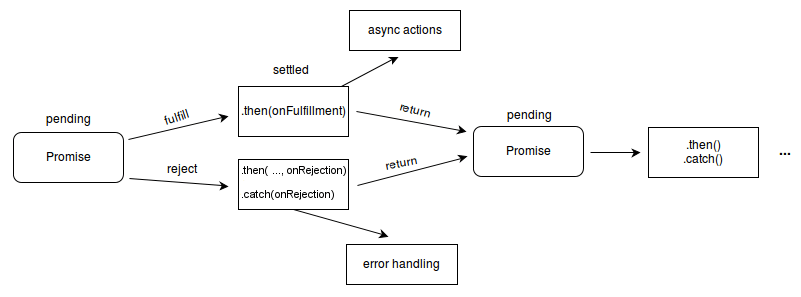
Promise
1
2
3
4
5
6
7
8
9
10
11
12
13
14
15
16
17
18
19
20
21
22
23
let done = true

const isItDoneYet = new Promise((resolve, reject) => {
  if (done) {
    const workDone = 'Here is the thing I built'
    resolve(workDone)
  } else {
    const why = 'Still working on something else'
    reject(why)
  }
})

const checkIfItsDone = () => {
  isItDoneYet
    .then(ok => {
      console.log(ok)
    })
    .catch(err => {
      console.error(err)
    })
}

checkIfItsDone()
A promise is commonly defined as a proxy for a value that will eventually become avaiable. promise is oneway to deal with asynchronous code.
How promise working
- When a promise called, it will start in a pending state. This means that the calling function continues executing, while the promise is pending until it resolves, giving the calling function whatever data was being requested.
- The created promise will end in resolved state or rejected state. Calling the respective callback function upon finishing.
- Promisifying This technique is a way to be able to use a classic JavaScript function that takes a callback, and have it return a promise. ```js const fs = require(‘fs’);
const getFile = fileName => {
return new Promise((resolve, reject) => {
fs.readFile(fileName, (err, data) => {
if (err) {
reject(err); // calling reject will cause the promise to fail with or without the error passed as an argument
return; // and we don’t want to go any further
}
resolve(data);
});
});
};
getFile(‘/etc/passwd’) .then(data => console.log(data)) .catch(err => console.error(err));
1
2
3
4
5
6
7
8
9
10
11
12
13
14
**Consuming a promise**
```js
const isItDoneYet = new Promise(/* ... as above ... */);
// ...

const checkIfItsDone = () => {
  isItDoneYet
    .then(ok => {
      console.log(ok);
    })
    .catch(err => {
      console.error(err);
    });
};
Chaining promises
1
2
3
4
5
6
7
8
9
10
11
12
13
14
15
16
17
18
19
const status = response => {
  if (response.status >= 200 && response.status < 300) {
    return Promise.resolve(response);
  }
  return Promise.reject(new Error(response.statusText));
};

const json = response => response.json();

fetch('/todos.json')
  .then(status) // note that the `status` function is actually **called** here, and that it **returns a promise***
  .then(json) // likewise, the only difference here is that the `json` function here returns a promise that resolves with `data`
  .then(data => {
    // ... which is why `data` shows up here as the first parameter to the anonymous function
    console.log('Request succeeded with JSON response', data);
  })
  .catch(error => {
    console.log('Request failed', error);
  });
Cascading Error
1
2
3
4
5
6
7
8
9
new Promise((resolve, reject) => {
  throw new Error('Error');
})
  .catch(err => {
    throw new Error('Error');
  })
  .catch(err => {
    console.error(err);
  });
Orchestrating promise Promise have two function synchonized
- Promise.all() ```js const f1 = fetch(‘/something.json’); const f2 = fetch(‘/something2.json’);
Promise.all([f1, f2]) .then(res => { console.log(‘Array of results’, res); }) .catch(err => { console.error(err); });
1
2
3
4
5
6
7
8
9
10
11
12
13
14
15
16
17
18
19
20
21
22
23
- Promise.race()
Promise.race() runs when the first of the promises you pass to it settles
- Promise.any()
Promise settle when any of the promise you pass to it fulfill or all of promise is get rejected(AggregateError)

**Common errors**
- Uncaught TypeError: undefined is not a promise
- UnhandledPromiseRejectionWarning
### Thenables
The JavaScript ecosystem had made multiple Promise implementations long before it became part of the language. Despite being represented differently internally, at the minimum, all Promise-like objects implement the Thenable interface. A thenable implements the .then() method, which is called with two callbacks: one for when the promise is fulfilled, one for when it's rejected. Promises are thenables as well.
```js
const aThenable = {
  then(onFulfilled, onRejected) {
    onFulfilled({
      // The thenable is fulfilled with another thenable
      then(onFulfilled, onRejected) {
        onFulfilled(42);
      },
    });
  },
};

Promise.resolve(aThenable); // A promise fulfilled with 42
- Complex promise ```js “use strict”; let promiseCount = 0;
function testPromise() {
const thisPromiseCount = ++promiseCount;
const log = document.getElementById(“log”);
// begin
log.insertAdjacentHTML(“beforeend”, ${thisPromiseCount}) Started<br>);
// We make a new promise: we promise a numeric count of this promise, starting from 1 (after waiting 3s)
const p1 = new Promise((resolve, reject) => {
// The executor function is called with the ability to resolve or reject the promise
log.insertAdjacentHTML(
“beforeend”,
${thisPromiseCount}) Promise constructor<br>
);
// This is only an example to create asynchronism
setTimeout(() => {
// We fulfill the promise !
resolve(thisPromiseCount);
}, Math.random() * 2000 + 1000);
});
// We define what to do when the promise is resolved with the then() call,
// and what to do when the promise is rejected with the catch() call
p1.then((val) => {
// Log the fulfillment value
log.insertAdjacentHTML(“beforeend”, ${val}) Promise fulfilled<br>);
}).catch((reason) => {
// Log the rejection reason
console.log(Handle rejected promise (${reason}) here.);
});
// end
log.insertAdjacentHTML(“beforeend”, ${thisPromiseCount}) Promise made<br>);
}
const btn = document.getElementById(“make-promise”); btn.addEventListener(“click”, testPromise);
1
2
3
```html
<button id="make-promise">Make a promise!</button>
<div id="log"></div>
Modern Asynchronous JavaScript with Async and Await
Async function are a combination of promise and generators, and basically, they are higher level abstraction over promises. async/await is built on promise
- Example when async function return a promise. An await function is calling until the promise is resolved or rejected. ```js const doSomethingAsync = () => { return new Promise(resolve => { setTimeout(() => resolve(‘I did something’), 3000) }) }
const doSomething = async () => { console.log(await doSomethingAsync()) }
console.log(‘Before’) doSomething() console.log(‘After’)
1
2
3
4
5
6
7
8
9
10
11
12
13
14
15
16
17
18
19
20
21
22
23
- **Promise vs async/await**
```js
// thenable
const getFirstUserData = () => {
  return fetch('/users.json') // get users list
    .then(response => response.json()) // parse JSON
    .then(users => users[0]) // pick first user
    .then(user => fetch(`/users/${user.name}`)) // get user data
    .then(userResponse => userResponse.json()); // parse JSON
};

getFirstUserData();
// implemented by async/await
const getFirstUserData = async () => {
  const response = await fetch('/users.json'); // get users list
  const users = await response.json(); // parse JSON
  const user = users[0]; // pick first user
  const userResponse = await fetch(`/users/${user.name}`); // get user data
  const userData = await userResponse.json(); // parse JSON
  return userData;
};

getFirstUserData();
- Multiple async functions in series ```js const promiseToDoSomething = () => { return new Promise(resolve => { setTimeout(() => resolve(‘I did something’), 10000) }) }
const watchOverSomeoneDoingSomething = async () => { const something = await promiseToDoSomething() return something + ‘\nand I watched’ }
const watchOverSomeoneWatchingSomeoneDoingSomething = async () => { const something = await watchOverSomeoneDoingSomething() return something + ‘\nand I watched as well’ }
watchOverSomeoneWatchingSomeoneDoingSomething().then(res => { console.log(res) })
1
2
3
4
5
6
7
8
9
10
11
12
13
14
15
16
17
18
19
20
21
22
23
24
25
26
27
28
### Closures
The combination of function bundled together (enclosed) with references to it surround state (THE LEXICAL environment). a closure gives you access to an outer function's scope from an inner function.

```js
function showHelp(help) {
  document.getElementById('help').textContent = help;
}

function makeHelpCallback(help) {
  return function () {
    showHelp(help);
  };
}

function setupHelp() {
  var helpText = [
    { id: 'email', help: 'Your e-mail address' },
    { id: 'name', help: 'Your full name' },
    { id: 'age', help: 'Your age (you must be over 16)' },
  ];

  for (var i = 0; i < helpText.length; i++) {
    var item = helpText[i];
    document.getElementById(item.id).onfocus = makeHelpCallback(item.help);
  }
}

setupHelp();
Scoping with let and const
Traditionally (before ES6), javascript only had two kind of scope: function scope and global scope. Variables declare with var are either function scoped and global scope, depending on whether they are declared within a function or outside function. This can be tricky, because blocks with curly braces do not create scope
- With
constyou can create a block scoped:temporal dead zone! - A closure is the combination of a function and the lexical environment within which that function was declared. This environment consits of any local variables that were in-scope at the time the closure was created.
Emulating private methods with closures
```JS const counter = (function () { let privateCounter = 0; function changeBy(val) { privateCounter += val; }
return { increment() { changeBy(1); },
decrement() { changeBy(-1); },
value() { return privateCounter; }, }; })();
console.log(counter.value()); // 0.
counter.increment(); counter.increment(); console.log(counter.value()); // 2.
counter.decrement(); console.log(counter.value()); // 1.
1
2
3
4
5
6
7
8
9
10
11
12
13
14
15
16
17
18
19
20
21
JS, prior to class, didn't have a native way of declaring private methods, but it was possible to emulate private methods using closure. Private methods aren't just useful fo restricting access to code. They also prove a powerful way of managing your global namespace.
#### Closure scope
- Local scope (own scope)
- Enclosing scope (can be block, function, or module scope)
- Global scope
```JS
// global scope
const e = 10;
function sum(a) {
  return function (b) {
    return function (c) {
      // outer functions scope
      return function (d) {
        // local scope
        return a + b + c + d + e;
      };
    };
  };
}

console.log(sum(1)(2)(3)(4)); // log 20
You can also write without anonymous functions:
// global scope
const e = 10;
function sum(a) {
  return function sum2(b) {
    return function sum3(c) {
      // outer functions scope
      return function sum4(d) {
        // local scope
        return a + b + c + d + e;
      };
    };
  };
}

const sum2 = sum(1);
const sum3 = sum2(2);
const sum4 = sum3(3);
const result = sum4(4);
console.log(result); //log 20
Event loop
In Nodejs Javascript, event loop is the “killer features” while nodejs run on single thread. There is just one thing happening at a time That’s actually helpful as it simplifier alot how a program without worry about concurrency issues. You just need to pay attention to write your code and avoid anything that could block the tread, like synchronous network call and infinite loops.
- In general, in most broswer there is an event loop for every browser tab, to make every process isolated and avoid webpage with infinite loop and heavy processsing to block your entire broswer.
- The environment manages multiple concurent event loops, to handle API call for examples. Webworker can handler multiple event loop as well
- So you need to concerned that your code will run on a single event loop, and write code with this thing in mind to avoid blocking it.
Blocking the event loop
Any javascript code that take long to return back control to the event loop will block the execution of any javascript code in the page, event block the UI page, and the user cannot click around, scroll page, and so on. All I/O primitive in JS are non-blocking. Network requests, filesystems operation, and so on. Being blocking is the exception, and this is why javascript is based so much on callback, and more recently on promise and async/await.
The call stack(LIFO)
The event loop continously check the call stack to see if there’s any function that need to run. While doing so, it adds any function call it find in the call stack and executes each one in order. You know the error stack trace you might be familiar.
A simple event loop explanation
The event loop on every iteration looks if there’s something in the call stack, and executes it until the call stack is empty. ```js const bar = () => console.log(‘bar’)
const baz = () => console.log(‘baz’)
const foo = () => { console.log(‘foo’) bar() baz() }
foo()
1
2
3
4
5
6
7
8
9
10
11
12
13
14
15
16
### Queuing function execution
The above example looks normal, there's nothing special about it: JavaScript finds things to execute, runs them in order.
Let's see how to defer a function until the stack is clear.
The use case of setTimeout(() => {}, 0) is to call a function, but execute it once every other function in the code has executed.
```JS
const bar = () => console.log('bar')

const baz = () => console.log('baz')

const foo = () => {
  console.log('foo')
  setTimeout(bar, 0)
  baz()
}

foo()
When this code runs, first foo() is called. Inside foo() we first call setTimeout, passing bar as an argument, and we instruct it to run immediately as fast as it can, passing 0 as the timer. Then we call baz().

The Message Queue
When setTimeOut is called. Browser or Node.JS start a timer. Once the timer expire as in this case we put 0 as the timeout. The call backfunction intermediately put in the Message queue.
Message queue is also where user initiated event like click, scroll, mouse or keyboard, fetch reponse before your code has opportunity to reach to them. Or also DOM event like onload.
The loop gives the priority to the callstack, and it’s first find in the callstack, and once there’s nothing in there. Ir’s goes to pich up things in the message queue.
ES6 Job Queue
ECMA script 2015 introduced concept of the job queue, which is used by Promise. It’s a way to execute a result of an async function as soon as posible, rather puting the end of the call stack. Promise is resole the current function ends will execute right after the function current function. Similar to a rollercoaster ride at an amusement park: the message queue puts you at the back of the queue, behind all the other people, where you will have to wait for your turn, while the job queue is the fastpass ticket that lets you take another ride right after you finished the previous one.
const bar = () => console.log('bar')

const baz = () => console.log('baz')

const foo = () => {
  console.log('foo')
  setTimeout(bar, 0)
  new Promise((resolve, reject) =>
    resolve('should be right after baz, before bar')
  ).then(resolve => console.log(resolve))
  baz()
}
foo()
That’s a big difference between Promises (and Async/await, which is built on promises) and plain old asynchronous functions through setTimeout() or other platform APIs. Finally, here’s what the call stack looks like for the example above:
Differences between Node.js and the Browser
- NodeJs give Huge advance, you can perform all your work on the web, both client and server. The confor of programming everything - the frontend and the backend in a single languages.
- Another big difference is that in Node.js you control the environment. Unless you are building an open source application that anyone can deploy anywhere, you know which version of Node.js you will run the application on. This means that you can write all the modern ES6-7-8-9 JavaScript that your Node.js version supports.
- Node.js supports both the CommonJS and ES module systems (since Node.js v12), while in the browser we are starting to see the ES Modules standard being implemented. This means that you can use both require() and import in Node.js, while you are limited to import in the browser.
The V8 JavaScript Engine
- V8 is the name of the JavaScript engine that powers Google Chrome.
- Firefox has SpiderMonkey
- Safari has JavaScriptCore (also called Nitro)
- Edge was originally based on Chakra but has more recently been rebuilt using Chromium and the V8 engine.
The quest for performance
V8 is written in C++, and it’s continously improved. It is portable and runs on Mac, Windows, Linux and several other systems. V8 is always evolving, just like the other javascript engines around, to speed up the Web and the Node.js ecosystem.
Compilation
Javascript is internally compiled by V8 with just in time(JIT), and compilation to speed up the excecution.
Run Node.js scripts
The usual way to run a Node.js program is to run globally available
nodecommand. If your main Node.js application file isapp.js, you can call it by typing:1 2
chmod u+x app.js node app.jsThe content of file
app.js```js #!/usr/bin/env node
// your code
1
2
3
4
5
6
### Restart the application automatically
Install `nodemon` module
### How to exit from a Node.js program
```JS
process.exit(1);
process.exitCode = 1;
Another example:
const express = require('express');

const app = express();

app.get('/', (req, res) => {
  res.send('Hi!');
});

const server = app.listen(3000, () => console.log('Server ready'));

process.on('SIGTERM', () => {
  server.close(() => {
    console.log('Process terminated');
  });
});
Express is a framework that uses the http module under the hood, app.listen() returns an instance of http. You would use https.createServer if you needed to serve your app using HTTPS, as app.listen only uses the http module.
Node.js, accept arguments from the command line
node app.js var_1=abc
How to read environment variables from Node.js
USER_ID=239482 USER_KEY=foobar node app.js
// process by JS
process.env.USER_ID; // "239482"
process.env.USER_KEY; // "foobar"
Note: process does not require a “require”, it’s automatically available. If you have multiple environment variables in your node project, you can create
.envfile in the root directory of your project, and use thedotenvpackage to load them during runtime.
The way you retrieve it is using the
processobject built into Node.js It exposes anargvproperty, which is an array that contains all the command line invocation arguments.process.argv.forEach((val, index) => { console.log(`${index}: ${val}`); }); const args = require('minimist')(process.argv.slice(2)); args.name;```JS require(‘dotenv’).config();
process.env.USER_ID; // “239482” process.env.USER_KEY; // “foobar” process.env.NODE_ENV; // “development”
1
2
3
4
5
6
7
8
9
10
11
12
13
14
15
16
17
18
19
20
21
22
23
24
25
> You can also run your js file with `node -r dotenv/config index.js` command if you don't want to import the package in your code.
You can install `minimist` package using `npm`. and when retrieve variable from nodejs use: `node app.js --name=joe`
### Output to the command line using Node.js
You can pass multiple variables to `console.log`
```JS
const x = 'x';
const y = 'y';
console.log(x, y);
console.log('My %s has %d ears', 'cat', 2);
console.clear()
const x = 1
const y = 2
const z = 3
console.count(
  'The value of x is ' + x +
  ' and has been checked .. how many times?'
)
console.count(
  'The value of x is ' + x +
  ' and has been checked .. how many times?'
)
console.count(
  'The value of y is ' + y +
  ' and has been checked .. how many times?'
)
Print stach trace
function2 = () => {
    console.trace()
}
function1 = () => function2();
function1();
Output console
1
2
3
4
5
6
7
8
9
10
11
Trace
    at function2 (repl:1:33)
    at function1 (repl:1:25)
    at repl:1:1
    at ContextifyScript.Script.runInThisContext (vm.js:44:33)
    at REPLServer.defaultEval (repl.js:239:29)
    at bound (domain.js:301:14)
    at REPLServer.runBound [as eval] (domain.js:314:12)
    at REPLServer.onLine (repl.js:440:10)
    at emitOne (events.js:120:20)
    at REPLServer.emit (events.js:210:7)
Calculate time spent
Calculate how much time a function you take to run: timetime, timeEnd
const doSomething = () => console.log('test');
const measureDoingSomething = () => {
  console.time('doSomething()');
  // do something, and measure the time it takes
  doSomething();
  console.timeEnd('doSomething()');
};
measureDoingSomething();
Create a progress bar
Progress is an awesome package that help create an progress bar in console. Installing it using npm install progress.
const ProgressBar = require('progress');

const bar = new ProgressBar(':bar', { total: 10 });
const timer = setInterval(() => {
  bar.tick();
  if (bar.complete) {
    clearInterval(timer);
  }
}, 100);
Server side Pagination in Node.js with Sequelize & MySQL
Server side pagination is better for:
- Larger data set
- Faster initial page load
- Accessibility for those running javascript
- Complex view running
Node.js Pagination with Sequelize and MySQL overview
Assume display a table below
 Node.js Express Server will exports API for pagination (with/without filter), here are some url samples:
- /api/tutorials?page=1&size=5
- /api/tutorials?size=5: using default value for page
- /api/tutorials?title=data&page=1&size=3: pagination & filter by title containing ‘data’
- /api/tutorials/published?page=2: pagination & filter by ‘published’ status
Result by json:
1
2
3
4
5
6
{
  "totalItems": 8,
  "tutorials": [...],
  "totalPages": 3,
  "currentPage": 1
}
Node.js Sequelize for Pagination
Sequelize provide way to implement pagination with
offsetandlimit - offset: quantity of items to skip
- limit: quantity of items to fetch Example:
- { offset: 3, limit: 2 }: skip first 3 items, fetch 4th and 5th items.
Sequelize findAll
1
2
3
4
5
model.findAll({
limit: 2,
offset: 3,
where: { title: { [Op.like]: `%js%` } }, // conditions
});
The result:
1
2
3
4
5
6
7
8
9
10
11
12
13
14
15
16
17
18
[
  {
      "id": 4,
      "title": "bezkoder Tut#4 Rest Apis",
      "description": "Tut#4 Description",
      "published": false,
      "createdAt": "2020-06-05T11:55:07.000Z",
      "updatedAt": "2020-06-05T11:55:07.000Z"
  },
  {
      "id": 5,
      "title": "bezkoder Tut#5 MySQL",
      "description": "Tut#5 Description",
      "published": false,
      "createdAt": "2020-06-05T11:55:11.000Z",
      "updatedAt": "2020-06-05T11:55:11.000Z"
  }
]
Sequelize findAndCountAll
Template
1
2
3
4
5
model.findAndCountAll({
limit: 2,
offset: 3,
where: {}, // conditions
});
Result
1
2
3
4
5
6
7
8
9
10
11
12
13
14
15
16
17
18
19
20
21
{
  "count": 8,
  "rows": [
      {
          "id": 4,
          "title": "bezkoder Tut#4 Rest Apis",
          "description": "Tut#4 Description",
          "published": false,
          "createdAt": "2020-06-05T11:55:07.000Z",
          "updatedAt": "2020-06-05T11:55:07.000Z"
      },
      {
          "id": 5,
          "title": "bezkoder Tut#5 MySQL",
          "description": "Tut#5 Description",
          "published": false,
          "createdAt": "2020-06-05T11:55:11.000Z",
          "updatedAt": "2020-06-05T11:55:11.000Z"
      }
  ]
}
Setup Node.js Express Application
Install necessary modules:
express,sequelize,mysql2Run the command:1
npm install express sequelize mysql2 cors --save
The Node.js project structure that we only need to add some changes to make the pagination work well.

Configure MySQL database & Sequelize
DB configure
1
2
3
4
5
6
7
8
9
10
11
12
13
module.exports = {
HOST: "localhost",
USER: "root",
PASSWORD: "123456",
DB: "testdb",
dialect: "mysql",
pool: {
  max: 5,
  min: 0,
  acquire: 30000,
  idle: 10000
}
};
Initialize Sequelize
Create app/models/index.js with the following code:
1
2
3
4
5
6
7
8
9
10
11
12
13
14
15
16
const dbConfig = require("../config/db.config.js");
const Sequelize = require("sequelize");
const sequelize = new Sequelize(dbConfig.DB, dbConfig.USER, dbConfig.PASSWORD, {
host: dbConfig.HOST,
dialect: dbConfig.dialect,
operatorsAliases: false,
pool: {
  max: dbConfig.pool.max,
  min: dbConfig.pool.min,
  acquire: dbConfig.pool.acquire,
  idle: dbConfig.pool.idle
}
});
const db = {};
db.Sequelize = Sequelize;
db.sequelize = sequelize;
Don’t forget to call
sync()method in server.js1 2 3 4 5 6 7 8 9 10 11
... const app = express(); app.use(...); const db = require("./app/models"); db.sequelize.sync(); /* db.sequelize.sync({ force: true }).then(() => { console.log("Drop and re-sync db."); }); */ ...
Create Data Model
In models folder, create tutorial.model.js file like this:
1
2
3
4
5
6
7
8
9
10
11
12
13
14
odule.exports = (sequelize, Sequelize) => {
const Tutorial = sequelize.define("tutorial", {
  title: {
    type: Sequelize.STRING
  },
  description: {
    type: Sequelize.STRING
  },
  published: {
    type: Sequelize.BOOLEAN
  }
});
return Tutorial;
};
After initializing Sequelize, we don’t need to write CRUD functions, Sequelize supports all of them. Now you can easily use following methods with pagination:
- get all Tutorials: findAll({ limit, offsCreate Node.js Express API layeret })
- find all Tutorials by title: findAll({ where: { title: … }, limit, offset })
- find and count all Tutorials: findAndCountAll({ limit, offset })
- find and count all Tutorials by title: findAndCountAll({ where: { title: … }, limit, offset })
Controller with Pagination
So, let’s write the function to map default response to desired structure:
1
2
3
4
5
6
7
8
9
10
11
const getPagination = (page, size) => {
const limit = size ? +size : 3;
const offset = page ? page * limit : 0;
return { limit, offset };
};
const getPagingData = (data, page, limit) => {
const { count: totalItems, rows: tutorials } = data;
const currentPage = page ? +page : 0;
const totalPages = Math.ceil(totalItems / limit);
return { totalItems, tutorials, totalPages, currentPage };
};
Now the code in tutorial.controller.js will look like this:
1
2
3
4
5
6
7
8
9
10
11
12
13
14
15
16
17
18
19
20
21
22
23
const db = require("../models");
const Tutorial = db.tutorials;
const Op = db.Sequelize.Op;
const getPagination = ...;
const getPagingData = ...;
// Retrieve all Tutorials from the database.
exports.findAll = (req, res) => {
const { page, size, title } = req.query;
var condition = title ? { title: { [Op.like]: `%${title}%` } } : null;
const { limit, offset } = getPagination(page, size);
Tutorial.findAndCountAll({ where: condition, limit, offset })
  .then(data => {
    const response = getPagingData(data, page, limit);
    res.send(response);
  })
  .catch(err => {
    res.status(500).send({
      message:
        err.message || "Some error occurred while retrieving tutorials."
    });
  });
};
// find all published Tutorial
Create Node.js Express API layer
1
2
3
4
5
6
7
8
9
10
module.exports = app => {
const tutorials = require("../controllers/tutorial.controller.js");
var router = require("express").Router();
// Retrieve all Tutorials
router.get("/", tutorials.findAll);
// Retrieve all published Tutorials
router.get("/published", tutorials.findAllPublished);
...
app.use('/api/tutorials', router);
};
Accept input from the command line in Node.js
readable stream such as
process.stdinand use modulereadlineto perform access input from the command line ```JS const readline = require(‘readline’).createInterface({ input: process.stdin, output: process.stdout, });
readline.question(What's your name?, name => {
console.log(Hi ${name}!);
readline.close();
});
1
2
3
4
5
6
7
8
9
10
11
12
13
14
15
Another example to perform by `inquirer`
```js
const inquirer = require('inquirer');

const questions = [
  {
    type: 'input',
    name: 'name',
    message: "What's your name?",
  },
];

inquirer.prompt(questions).then(answers => {
  console.log(`Hi ${answers.name}!`);
});
Expose functionality from a Node.js file using exports
When you want to import something you use
1
const library = require('.library')
This is what the module.exports API offfered by the module system to allow us to do.
You can do so in 2 ways
// car.js
const car = {
  brand: 'Ford',
  model: 'Fiesta',
};

module.exports = car;
// index.js
const car = require('./car')
The second way is to add the exported object as a property of exports. This way allows you to export multiple objects, functions or data:
const car = {
  brand: 'Ford',
  model: 'Fiesta',
};

exports.car = car;
Or directly
exports.car = {
  brand: 'Ford',
  model: 'Fiesta',
};
And in the other file, you’ll use it by referencing a property of your import:
const items = require('./car');

const { car } = items;
Or you can use a destructuring assigement
const { car } = require('./car')
Example
// car.js
exports.car = {
  brand: 'Ford',
  model: 'Fiesta',
};

module.exports = {
  brand: 'Tesla',
  model: 'Model S',
};

// app.js
const tesla = require('./car');
const ford = require('./car').car;

console.log(tesla, ford);
This will print { brand: ‘Tesla’, model: ‘Model S’ } undefined since the require function’s return value has been updated to the object that module.exports points to, so the property that exports added can’t be accessed.
An introduction to the npm package manager
- npm
- yarn
- pnpm Install from single package Often you’ll see more flags added to this command:
- –save-dev installs and adds the entry to the package.json file devDependencies
- –no-save installs but does not add the entry to the package.json file dependencies
- –save-optional installs and adds the entry to the package.json file optionalDependencies
-
–no-optional will prevent optional dependencies from being installed Shorthands of the flags can also be used:
- -S: –save
- -D: –save-dev
- -O: –save-optional
To Update
1
2
npm update
npm update <package-name>
You can manage version by
npm. Install or update package with version by command1
npm install <package-name>@<version>Running Tasks
npm run <task-name>{ "scripts": { "watch": "webpack --watch --progress --colors --config webpack.conf.js", "dev": "webpack --progress --colors --config webpack.conf.js", "prod": "NODE_ENV=production webpack -p --config webpack.conf.js", } }Where does npm install the packages?
- a local install
- a global install
By default, the package is installed in the current file tree, under the node_modules subfolder. A global installation is performed using the
-gflagThe package.json guide
The file structure of
package.jsonis present in Json filecopy { "name": "test-project", "version": "1.0.0", "description": "A Vue.js project", "main": "src/main.js", "private": true, "scripts": { "dev": "webpack-dev-server --inline --progress --config build/webpack.dev.conf.js", "start": "npm run dev", "unit": "jest --config test/unit/jest.conf.js --coverage", "test": "npm run unit", "lint": "eslint --ext .js,.vue src test/unit", "build": "node build/build.js" }, "dependencies": { "vue": "^2.5.2" }, "devDependencies": { "autoprefixer": "^7.1.2", "babel-core": "^6.22.1", "babel-eslint": "^8.2.1", "babel-helper-vue-jsx-merge-props": "^2.0.3", "babel-jest": "^21.0.2", "babel-loader": "^7.1.1", "babel-plugin-dynamic-import-node": "^1.2.0", "babel-plugin-syntax-jsx": "^6.18.0", "babel-plugin-transform-es2015-modules-commonjs": "^6.26.0", "babel-plugin-transform-runtime": "^6.22.0", "babel-plugin-transform-vue-jsx": "^3.5.0", "babel-preset-env": "^1.3.2", "babel-preset-stage-2": "^6.22.0", "chalk": "^2.0.1", "copy-webpack-plugin": "^4.0.1", "css-loader": "^0.28.0", "eslint": "^4.15.0", "eslint-config-airbnb-base": "^11.3.0", "eslint-friendly-formatter": "^3.0.0", "eslint-import-resolver-webpack": "^0.8.3", "eslint-loader": "^1.7.1", "eslint-plugin-import": "^2.7.0", "eslint-plugin-vue": "^4.0.0", "extract-text-webpack-plugin": "^3.0.0", "file-loader": "^1.1.4", "friendly-errors-webpack-plugin": "^1.6.1", "html-webpack-plugin": "^2.30.1", "jest": "^22.0.4", "jest-serializer-vue": "^0.3.0", "node-notifier": "^5.1.2", "optimize-css-assets-webpack-plugin": "^3.2.0", "ora": "^1.2.0", "portfinder": "^1.0.13", "postcss-import": "^11.0.0", "postcss-loader": "^2.0.8", "postcss-url": "^7.2.1", "rimraf": "^2.6.0", "semver": "^5.3.0", "shelljs": "^0.7.6", "uglifyjs-webpack-plugin": "^1.1.1", "url-loader": "^0.5.8", "vue-jest": "^1.0.2", "vue-loader": "^13.3.0", "vue-style-loader": "^3.0.1", "vue-template-compiler": "^2.5.2", "webpack": "^3.6.0", "webpack-bundle-analyzer": "^2.9.0", "webpack-dev-server": "^2.9.1", "webpack-merge": "^4.1.0" }, "engines": { "node": ">= 6.0.0", "npm": ">= 3.0.0" }, "browserslist": ["> 1%", "last 2 versions", "not ie <= 8"] }There are lots of things going on here:
- version indicates the current version
- name sets the application/package name
- description is a brief description of the app/package
- main sets the entry point for the application
- private if set to true prevents the app/package to be accidentally published on npm
- scripts defines a set of node scripts you can run
- dependencies sets a list of npm packages installed as dependencies
- devDependencies sets a list of npm packages installed as development dependencies
- engines sets which versions of Node.js this package/app works on
- browserslist is used to tell which browsers (and their versions) you want to support
The package-lock.json file
The goal of
package-lock.jsonfile is to keep track of the exact version of every package that is installed so that a product is 100% reproducible in the same way even if packages are updated by their maintainers.Find the installed version of an npm package
To see the version of all installed npm packages, including their dependencies
1
npm list
for example
1
2
3
4
5
6
7
8
9
10
11
12
❯ npm list
/Users/joe/dev/node/cowsay
└─┬ cowsay@1.3.1
├── get-stdin@5.0.1
├─┬ optimist@0.6.1
│ ├── minimist@0.0.10
│ └── wordwrap@0.0.3
├─┬ string-width@2.1.1
│ ├── is-fullwidth-code-point@2.0.0
│ └─┬ strip-ansi@4.0.0
│   └── ansi-regex@3.0.0
└── strip-eof@1.0.0
To get only your top-level packages (basically, the ones you told npm to install and you listed in the package.json), run npm list –depth=0:
Install an older version of an npm package
You might also be interested in listing all the previous versions of a package. You can do it with npm view
versions: ```bash ❯ npm view cowsay versions
[ ‘1.0.0’, ‘1.0.1’, ‘1.0.2’, ‘1.0.3’, ‘1.1.0’, ‘1.1.1’, ‘1.1.2’, ‘1.1.3’, ‘1.1.4’, ‘1.1.5’, ‘1.1.6’, ‘1.1.7’, ‘1.1.8’, ‘1.1.9’, ‘1.2.0’, ‘1.2.1’, ‘1.3.0’, ‘1.3.1’ ]
1
2
3
Install package
```bash
npm install <package>@<version>
Semantic Versioning using npm
All versions have 3 digits: x.y.z
- the first digit is the major version
- the second digit is the minor version
- the third digit is the patch version Let’s see those rules in detail:
- ^: It will only do updates that do not change the leftmost non-zero number i.e there can be changes in minor version or patch version but not in major version. If you write ^13.1.0, when running npm update, it can update to 13.2.0, 13.3.0 even 13.3.1, 13.3.2 and so on, but not to 14.0.0 or above.
- ~: if you write ~0.13.0 when running npm update it can update to patch releases: 0.13.1 is ok, but 0.14.0 is not.
- >: you accept any version higher than the one you specify
- >=: you accept any version equal to or higher than the one you specify
- <=: you accept any version equal or lower to the one you specify
- <: you accept any version lower than the one you specify
- =: you accept that exact version
- -: you accept a range of versions. Example: 2.1.0 - 2.6.2
-
: you combine sets. Example: < 2.1 > 2.6 - no symbol: you accept only that specific version you specify (1.2.1)
- latest: you want to use the latest version available
Uninstalling npm packages
1
2
npm uninstall <package-name>
npm uninstall -g <package-name>
npm global or local packages
In your code you can only require local packages:
1
require('package-name')
A package should be installed globally when it provides an executable command that you run from the shell (CLI), and it’s reused across projects. Great examples of popular global packages which you might know are
- npm
- vue-cli
- grunt-cli
- mocha
- react-native-cli
- gatsby-cli
- forever
- nodemon
You probably have some packages installed globally already on your system. You can see them by running
1
npm list -g --depth 0
npm dependencies and devDependencies
When you install an npm package, you are installing it as a dependency. When you install with option
--save-dev, you are installing it as a development dependency. development dependencies are intended as development-only packages, that are unneeded in production. So when you run commannpm installin production you should need include flagproductionsuch asnpm install --production.The npx Node.js Package Runner
npm allow you to run that npm command without installing it first. If the command isn’t found,
npxwill install it into a central cache1
npx cowsay "Hello"Now, this is a funny useless command. Other scenarios include:
- running the vue CLI tool to create new applications and run them: npx @vue/cli create my-vue-app
- creating a new React app using create-react-app: npx create-react-app my-react-app
Run some code using a different Node.js version
1
2
npx node@10 -v #v10.18.1
npx node@12 -v #v12.14.1
Run arbitrary code snippets directly from a URL
1
npx https://gist.github.com/zkat/4bc19503fe9e9309e2bfaa2c58074d32
Understanding process.nextTick()
Every time the event loop takes a full trip, we call it a tick.
process.nextTick(() => {
// do something
});
The event loop is busy to run the current code. When this operation ends, the JS engine runs all the functions passed to
nextTickcalls during that operation. It the way we can tell the JS engine to process a function asynchronously, but as soon as possible, not queue it. CallingsetTimeout(() => {}, 0)will execute the function at the end ofnext tick, much later than when usingnextTick()which prioritizes the call and executes it just before the beginning of the next tick.
Use nextTick() when you want to make sure that in the next event loop iteration that code is already executed.
Understanding setImmediate()
Any function passed as the setImmediate() argument is a callback that’s executed in the next iteration of the event loop.
How is setImmediate() different from setTimeout(() => {}, 0) (passing a 0ms timeout), and from process.nextTick() and Promise.then()?
A function passed to process.nextTick() is going to be executed on the current iteration of the event loop, after the current operation ends. This means it will always execute before setTimeout and setImmediate.
A setTimeout() callback with a 0ms delay is very similar to setImmediate. The execution order will depend on various factors, but they will be both run in the next iteration of the event loop.
A process.nextTick callback is added to process.nextTick queue. A Promise.then() callback is added to promise.microtask queue. A setTimeou, setImmediate callback is added to macrotask queue
1
2
3
4
5
6
7
8
9
10
11
12
13
14
15
16
const baz = () => console.log('baz');
const foo = () => console.log('foo');
const zoo = () => console.log('zoo');
const start = () => {
  console.log('start');
  setImmediate(baz);
  new Promise((resolve, reject) => {
    resolve('bar');
  }).then((resolve) => {
    console.log(resolve);
    process.nextTick(zoo);
  });
  process.nextTick(foo);
};
start();
// start foo bar zoo baz
This code will first call start(), then call foo() in process.nextTick queue. After that, it will handle promises microtask queue, which prints bar and adds zoo() in process.nextTick queue at the same time. Then it will call zoo() which has just been added. In the end, the baz() in macrotask queue is called.
The Node.js Event emitter
On the backend side, Node.js offers us the option to build a similar system using event module.
This module, inparticular, offers the EventEmitter class, which we’ll use to handle our events.
You initializa that using
1
2
const EventEmitter = require('events')
const eventEmitter = new EventEmitter();
This object exposes, among many others, the on and emit methods.
emitis used to trigger an eventonis used to add a callback function that’s going to be executed when the event is triggered. For example, let’s create astartevent, and as a matter of providing a sample, we react to that by just logging to the console:1 2 3
eventEmitter.on('start', () => { console.log('started'); });
When we run
1
eventEmitter.emit('start');
You can pass argument to the event handler by passing them as additional argument to
emit```js eventEmitter.on(‘start’, (start, end) => { console.log(started from ${start} to ${end}); });
eventEmitter.emit(‘start’, 1, 100);
1
2
3
4
5
6
7
8
9
10
11
12
13
14
15
16
The EventEmitter object also exposes several other methods to interact with events, like

- once(): add a one-time listener
- removeListener() / off(): remove an event listener from an event
- removeAllListeners(): remove all listeners for an event.

References [docs](https://nodejs.org/api/events.html)
## REST API Development with Node.js, Express, and MongoDB
Tutorial basic to help create a rest api framework with node.js by express and mongodb using JavaScript ES2015. References to [github project](https://github.com/maitraysuthar/rest-api-nodejs-mongodb)
### Software Requirements
- Node.js 8+
- MongoDB 3.6+ (Recommended 4+)
### How to install
- b1
```sh
git clone https://github.com/maitraysuthar/rest-api-nodejs-mongodb.git
- b2
1
2
cd rest-api-nodejs-mongodb
npm install
- b3 Setting up environments
- You will find a file named .env.example on root directory of project.
- Create a new file by copying and pasting the file and then renaming it to just .env
1
cp .env.example .env - The file .env is already ignored, so you never commit your credentials.
- Change the values of the file to your environment. Helpful comments added to .env.example file to understand the constants.
Project structure
1
2
3
4
5
6
7
8
9
10
11
12
13
14
15
16
17
18
19
20
21
22
23
24
25
26
27
28
29
30
.
├── app.js
├── package.json
├── bin
│   └── www
├── controllers
│   ├── AuthController.js
│   └── BookController.js
├── models
│   ├── BookModel.js
│   └── UserModel.js
├── routes
│   ├── api.js
│   ├── auth.js
│   └── book.js
├── middlewares
│   ├── jwt.js
├── helpers
│   ├── apiResponse.js
│   ├── constants.js
│   ├── mailer.js
│   └── utility.js
├── test
│   ├── testConfig.js
│   ├── auth.js
│   └── book.js
└── public
  ├── index.html
  └── stylesheets
   └── style.css
- b5: Running API server locally
1
npm run dev
Integration
- Write new model: If you need to add more models to the project just create a new file in
/models/and use them in the controllers. - Creating new routes: If you need to add more routes to the project just create a new file in
/routes/and add it in/routes/api.jsit will be loaded dynamically. - Creating new controllers: If you need to add more controllers to the project just create a new file in
/controllers/and use them in the routes.Running Test Cases
Running Eslint
1
npm run lint
Prequise
- npm
- Express JS
- Mongo DB
- Rest API integrate Authentication and CRUD
package.json example package manage installed
1
2
3
4
5
6
7
8
9
10
11
12
13
14
15
16
17
18
19
20
21
22
23
24
25
26
27
28
29
30
31
32
33
34
35
36
{
"name": "rest-api-nodejs-mongodb",
"version": "1.0.0",
"private": true,
"scripts": {
  "start": "node ./bin/www",
  "dev": "nodemon ./bin/www",
  "test": "nyc _mocha --timeout 10000 --exit --report lcovonly -- -R spec",
  "lint": "eslint --fix --config .eslintrc.json \"**/*.js\""
},
"dependencies": {
  "bcrypt": "^3.0.6",
  "codacy-coverage": "^3.4.0",
  "cookie-parser": "~1.4.3",
  "cors": "^2.8.5",
  "debug": "~2.6.9",
  "dotenv": "^8.2.0",
  "express": "~4.16.0",
  "express-jwt": "^5.3.1",
  "express-validator": "^6.2.0",
  "jsonwebtoken": "^8.5.1",
  "mocha-lcov-reporter": "^1.3.0",
  "moment": "^2.24.0",
  "mongoose": "^5.7.6",
  "morgan": "~1.9.0",
  "nodemailer": "^6.3.1"
},
"devDependencies": {
  "chai": "^4.2.0",
  "chai-http": "^4.3.0",
  "eslint": "^6.5.1",
  "mocha": "^6.2.2",
  "nodemon": "^1.19.4",
  "nyc": "^14.1.1"
}
}
Authentication
NodeJs package
expressis popular package help to create server.JWT
```js const jwt = require(“express-jwt”); const secret = process.env.JWT_SECRET;
const authenticate = jwt({ secret: secret });
module.exports = authenticate;
1
2
The mechanism of authentication when user register or login into server that user will receive a token was generated by server in response to user. To generate token by JWT, nodejs provide a package `express-jwt`.
Both `JWT_SECRET` and `JWT_TIMEOUT_DURATION` variable is configure in `.env` file.
MONGODB_URL=mongodb://127.0.0.1:27017/rest-api-nodejs-mongodb
Example Connection String:-
mongodb://127.0.0.1:27017/rest-api-nodejs-mongodb
mongodb://[MongodbHost]:[PORT]/[DatabaseName]
JWT_SECRET=abcdefghijklmnopqrstuvwxyz1234567890
Example Secret:- abcdefghijklmnopqrstuvwxyz1234567890
JWT_TIMEOUT_DURATION=”2 hours”
You can place duration available here: https://github.com/auth0/node-jsonwebtoken#usage
Search for “expiresIn” option on above link.
EMAIL_SMTP_HOST=YourSMTPHost EMAIL_SMTP_PORT=YourSMTPPort EMAIL_SMTP_USERNAME=YourSMTPUsername EMAIL_SMTP_PASSWORD=YourSMTPPassword
true for 465, false for other ports
EMAIL_SMTP_SECURE=false
1
2
3
4
5
6
7
8
9
10
11
12
13
14
#### Router
create file `auth.js` inside `routes` folder with content:
```js
var express = require("express");
const AuthController = require("../controllers/AuthController");

var router = express.Router();

router.post("/register", AuthController.register);
router.post("/login", AuthController.login);
router.post("/verify-otp", AuthController.verifyConfirm);
router.post("/resend-verify-otp", AuthController.resendConfirmOtp);

module.exports = router;
- Import
expressmodule and controllerAuthController1 2
var express = require("express"); const AuthController = require("../controllers/AuthController");
- Router apis:
register,login,verify-otp, ‘resend-verify-otp’. Such apis was require packagenodemailerand variable configure in.env.
index serve
1
2
3
4
5
6
7
8
9
var express = require("express");
var router = express.Router();

/* GET home page. */
router.get("/", function(req, res) {
    res.render("index", { title: "Express" });
});

module.exports = router;
api router
1
2
3
4
5
6
7
8
9
10
var express = require("express");
var authRouter = require("./auth");
var bookRouter = require("./book");

var app = express();

app.use("/auth/", authRouter);
app.use("/book/", bookRouter);

module.exports = app;
book router
1
2
3
4
5
6
7
8
9
10
11
12
var express = require("express");
const BookController = require("../controllers/BookController");

var router = express.Router();

router.get("/", BookController.bookList);
router.get("/:id", BookController.bookDetail);
router.post("/", BookController.bookStore);
router.put("/:id", BookController.bookUpdate);
router.delete("/:id", BookController.bookDelete);

module.exports = router;
AuthController
1
2
3
4
5
6
7
8
9
10
11
12
13
14
15
16
17
18
19
20
21
22
23
24
25
26
27
28
29
30
31
32
33
34
35
36
37
38
39
40
41
42
43
44
45
46
47
48
49
50
51
52
53
54
55
56
57
58
59
60
61
62
63
64
65
66
67
68
69
70
71
72
73
74
75
76
77
78
79
80
81
82
83
84
85
86
87
88
89
90
91
92
93
94
95
96
97
98
99
100
101
102
103
104
105
106
107
108
109
110
111
112
113
114
115
116
117
118
119
120
121
122
123
124
125
126
127
128
129
130
131
132
133
134
135
136
137
138
139
140
141
142
143
144
145
146
147
148
149
150
151
152
153
154
155
156
157
158
159
160
161
162
163
164
165
166
167
168
169
170
171
172
173
174
175
176
177
178
179
180
181
182
183
184
185
186
187
188
189
190
191
192
193
194
195
196
197
198
199
200
201
202
203
204
205
206
207
208
209
210
211
212
213
214
215
216
217
218
219
220
221
222
223
224
225
226
227
228
229
230
231
232
233
234
235
236
237
238
239
240
241
242
243
244
245
246
247
248
249
250
251
252
253
254
255
256
257
258
259
260
261
262
263
264
const UserModel = require("../models/UserModel");
const { body,validationResult } = require("express-validator");
const { sanitizeBody } = require("express-validator");
//helper file to prepare responses.
const apiResponse = require("../helpers/apiResponse");
const utility = require("../helpers/utility");
const bcrypt = require("bcrypt");
const jwt = require("jsonwebtoken");
const mailer = require("../helpers/mailer");
const { constants } = require("../helpers/constants");

/**
 * User registration.
 *
 * @param {string}      firstName
 * @param {string}      lastName
 * @param {string}      email
 * @param {string}      password
 *
 * @returns {Object}
 */
exports.register = [
    // Validate fields.
    body("firstName").isLength({ min: 1 }).trim().withMessage("First name must be specified.")
        .isAlphanumeric().withMessage("First name has non-alphanumeric characters."),
    body("lastName").isLength({ min: 1 }).trim().withMessage("Last name must be specified.")
        .isAlphanumeric().withMessage("Last name has non-alphanumeric characters."),
    body("email").isLength({ min: 1 }).trim().withMessage("Email must be specified.")
        .isEmail().withMessage("Email must be a valid email address.").custom((value) => {
            return UserModel.findOne({email : value}).then((user) => {
                if (user) {
                    return Promise.reject("E-mail already in use");
                }
            });
        }),
    body("password").isLength({ min: 6 }).trim().withMessage("Password must be 6 characters or greater."),
    // Sanitize fields.
    sanitizeBody("firstName").escape(),
    sanitizeBody("lastName").escape(),
    sanitizeBody("email").escape(),
    sanitizeBody("password").escape(),
    // Process request after validation and sanitization.
    (req, res) => {
        try {
            // Extract the validation errors from a request.
            const errors = validationResult(req);
            if (!errors.isEmpty()) {
                // Display sanitized values/errors messages.
                return apiResponse.validationErrorWithData(res, "Validation Error.", errors.array());
            }else {
                //hash input password
                bcrypt.hash(req.body.password,10,function(err, hash) {
                    // generate OTP for confirmation
                    let otp = utility.randomNumber(4);
                    // Create User object with escaped and trimmed data
                    var user = new UserModel(
                        {
                            firstName: req.body.firstName,
                            lastName: req.body.lastName,
                            email: req.body.email,
                            password: hash,
                            confirmOTP: otp
                        }
                    );
                    // Html email body
                    let html = "<p>Please Confirm your Account.</p><p>OTP: "+otp+"</p>";
                    // Send confirmation email
                    mailer.send(
                        constants.confirmEmails.from,
                        req.body.email,
                        "Confirm Account",
                        html
                    ).then(function(){
                        // Save user.
                        user.save(function (err) {
                            if (err) { return apiResponse.ErrorResponse(res, err); }
                            let userData = {
                                _id: user._id,
                                firstName: user.firstName,
                                lastName: user.lastName,
                                email: user.email
                            };
                            return apiResponse.successResponseWithData(res,"Registration Success.", userData);
                        });
                    }).catch(err => {
                        console.log(err);
                        return apiResponse.ErrorResponse(res,err);
                    }) ;
                });
            }
        } catch (err) {
            //throw error in json response with status 500.
            return apiResponse.ErrorResponse(res, err);
        }
    }];

/**
 * User login.
 *
 * @param {string}      email
 * @param {string}      password
 *
 * @returns {Object}
 */
exports.login = [
    body("email").isLength({ min: 1 }).trim().withMessage("Email must be specified.")
        .isEmail().withMessage("Email must be a valid email address."),
    body("password").isLength({ min: 1 }).trim().withMessage("Password must be specified."),
    sanitizeBody("email").escape(),
    sanitizeBody("password").escape(),
    (req, res) => {
        try {
            const errors = validationResult(req);
            if (!errors.isEmpty()) {
                return apiResponse.validationErrorWithData(res, "Validation Error.", errors.array());
            }else {
                UserModel.findOne({email : req.body.email}).then(user => {
                    if (user) {
                        //Compare given password with db's hash.
                        bcrypt.compare(req.body.password,user.password,function (err,same) {
                            if(same){
                                //Check account confirmation.
                                if(user.isConfirmed){
                                    // Check User's account active or not.
                                    if(user.status) {
                                        let userData = {
                                            _id: user._id,
                                            firstName: user.firstName,
                                            lastName: user.lastName,
                                            email: user.email,
                                        };
                                        //Prepare JWT token for authentication
                                        const jwtPayload = userData;
                                        const jwtData = {
                                            expiresIn: process.env.JWT_TIMEOUT_DURATION,
                                        };
                                        const secret = process.env.JWT_SECRET;
                                        //Generated JWT token with Payload and secret.
                                        userData.token = jwt.sign(jwtPayload, secret, jwtData);
                                        return apiResponse.successResponseWithData(res,"Login Success.", userData);
                                    }else {
                                        return apiResponse.unauthorizedResponse(res, "Account is not active. Please contact admin.");
                                    }
                                }else{
                                    return apiResponse.unauthorizedResponse(res, "Account is not confirmed. Please confirm your account.");
                                }
                            }else{
                                return apiResponse.unauthorizedResponse(res, "Email or Password wrong.");
                            }
                        });
                    }else{
                        return apiResponse.unauthorizedResponse(res, "Email or Password wrong.");
                    }
                });
            }
        } catch (err) {
            return apiResponse.ErrorResponse(res, err);
        }
    }];

/**
 * Verify Confirm otp.
 *
 * @param {string}      email
 * @param {string}      otp
 *
 * @returns {Object}
 */
exports.verifyConfirm = [
    body("email").isLength({ min: 1 }).trim().withMessage("Email must be specified.")
        .isEmail().withMessage("Email must be a valid email address."),
    body("otp").isLength({ min: 1 }).trim().withMessage("OTP must be specified."),
    sanitizeBody("email").escape(),
    sanitizeBody("otp").escape(),
    (req, res) => {
        try {
            const errors = validationResult(req);
            if (!errors.isEmpty()) {
                return apiResponse.validationErrorWithData(res, "Validation Error.", errors.array());
            }else {
                var query = {email : req.body.email};
                UserModel.findOne(query).then(user => {
                    if (user) {
                        //Check already confirm or not.
                        if(!user.isConfirmed){
                            //Check account confirmation.
                            if(user.confirmOTP == req.body.otp){
                                //Update user as confirmed
                                UserModel.findOneAndUpdate(query, {
                                    isConfirmed: 1,
                                    confirmOTP: null
                                }).catch(err => {
                                    return apiResponse.ErrorResponse(res, err);
                                });
                                return apiResponse.successResponse(res,"Account confirmed success.");
                            }else{
                                return apiResponse.unauthorizedResponse(res, "Otp does not match");
                            }
                        }else{
                            return apiResponse.unauthorizedResponse(res, "Account already confirmed.");
                        }
                    }else{
                        return apiResponse.unauthorizedResponse(res, "Specified email not found.");
                    }
                });
            }
        } catch (err) {
            return apiResponse.ErrorResponse(res, err);
        }
    }];

/**
 * Resend Confirm otp.
 *
 * @param {string}      email
 *
 * @returns {Object}
 */
exports.resendConfirmOtp = [
    body("email").isLength({ min: 1 }).trim().withMessage("Email must be specified.")
        .isEmail().withMessage("Email must be a valid email address."),
    sanitizeBody("email").escape(),
    (req, res) => {
        try {
            const errors = validationResult(req);
            if (!errors.isEmpty()) {
                return apiResponse.validationErrorWithData(res, "Validation Error.", errors.array());
            }else {
                var query = {email : req.body.email};
                UserModel.findOne(query).then(user => {
                    if (user) {
                        //Check already confirm or not.
                        if(!user.isConfirmed){
                            // Generate otp
                            let otp = utility.randomNumber(4);
                            // Html email body
                            let html = "<p>Please Confirm your Account.</p><p>OTP: "+otp+"</p>";
                            // Send confirmation email
                            mailer.send(
                                constants.confirmEmails.from,
                                req.body.email,
                                "Confirm Account",
                                html
                            ).then(function(){
                                user.isConfirmed = 0;
                                user.confirmOTP = otp;
                                // Save user.
                                user.save(function (err) {
                                    if (err) { return apiResponse.ErrorResponse(res, err); }
                                    return apiResponse.successResponse(res,"Confirm otp sent.");
                                });
                            });
                        }else{
                            return apiResponse.unauthorizedResponse(res, "Account already confirmed.");
                        }
                    }else{
                        return apiResponse.unauthorizedResponse(res, "Specified email not found.");
                    }
                });
            }
        } catch (err) {
            return apiResponse.ErrorResponse(res, err);
        }
    }];
- ExpressJs support MVC architechture, In controller have actions provide authen such as
register,login,confirmOTP,resendConfirm - Model
UserModelstore and query data from mongoDB.1 2 3 4 5 6 7 8 9 10
const UserModel = require("../models/UserModel"); const { body,validationResult } = require("express-validator"); const { sanitizeBody } = require("express-validator"); //helper file to prepare responses. const apiResponse = require("../helpers/apiResponse"); const utility = require("../helpers/utility"); const bcrypt = require("bcrypt"); const jwt = require("jsonwebtoken"); const mailer = require("../helpers/mailer"); const { constants } = require("../helpers/constants");
- Validation package
express-validatortake thebodyandvalidationmodule1 2 3 4 5 6 7 8 9 10 11 12 13
body("firstName").isLength({ min: 1 }).trim().withMessage("First name must be specified.") .isAlphanumeric().withMessage("First name has non-alphanumeric characters."), body("lastName").isLength({ min: 1 }).trim().withMessage("Last name must be specified.") .isAlphanumeric().withMessage("Last name has non-alphanumeric characters."), body("email").isLength({ min: 1 }).trim().withMessage("Email must be specified.") .isEmail().withMessage("Email must be a valid email address.").custom((value) => { return UserModel.findOne({email : value}).then((user) => { if (user) { return Promise.reject("E-mail already in use"); } }); }), body("password").isLength({ min: 6 }).trim().withMessage("Password must be 6 characters or greater.")
- Each line is element of array impement by
exportfunction. Express will run through each element and store variable in memory and same stack. The validation, The request parameter, The process element, so on.1 2 3 4 5 6 7 8 9 10 11 12 13 14 15 16 17 18 19 20 21 22 23 24 25 26 27 28 29 30 31 32 33 34 35 36 37 38 39 40 41 42 43 44 45 46 47 48 49 50 51 52 53
(req, res) => { try { // Extract the validation errors from a request. const errors = validationResult(req); if (!errors.isEmpty()) { // Display sanitized values/errors messages. return apiResponse.validationErrorWithData(res, "Validation Error.", errors.array()); }else { //hash input password bcrypt.hash(req.body.password,10,function(err, hash) { // generate OTP for confirmation let otp = utility.randomNumber(4); // Create User object with escaped and trimmed data var user = new UserModel( { firstName: req.body.firstName, lastName: req.body.lastName, email: req.body.email, password: hash, confirmOTP: otp } ); // Html email body let html = "<p>Please Confirm your Account.</p><p>OTP: "+otp+"</p>"; // Send confirmation email mailer.send( constants.confirmEmails.from, req.body.email, "Confirm Account", html ).then(function(){ // Save user. user.save(function (err) { if (err) { return apiResponse.ErrorResponse(res, err); } let userData = { _id: user._id, firstName: user.firstName, lastName: user.lastName, email: user.email }; return apiResponse.successResponseWithData(res,"Registration Success.", userData); }); }).catch(err => { console.log(err); return apiResponse.ErrorResponse(res,err); }) ; }); } } catch (err) { //throw error in json response with status 500. return apiResponse.ErrorResponse(res, err); } }
- code inside is same with JS code. After validation, the action
registermove to process logic register with user attribute save to DB. A mail send to user when sucessful saved. Try catch for unexpected errors: bcryptmodule for hash password and this is a function js in ECMASCRIPT 20151 2 3 4
bcrypt.hash(req.body.password,10,function(err, hash) { }).catch(err => { console.log(err); return apiResponse.ErrorResponse(res,err); }) ;
(req, res)is object request and response and parameters of functionregister. Response send to user1 2 3 4
// sucess return apiResponse.successResponseWithData(res,"Registration Success.", userData); // error return apiResponse.ErrorResponse(res,err);
- About the api resonpose structure in json format and js code, used
jsonwebtokenandexpress-jwtmodule for generate token and authentication user request. ```js exports.successResponse = function (res, msg) { var data = { status: 1, message: msg }; return res.status(200).json(data); };
exports.successResponseWithData = function (res, msg, data) { var resData = { status: 1, message: msg, data: data }; return res.status(200).json(resData); };
exports.ErrorResponse = function (res, msg) { var data = { status: 0, message: msg, }; return res.status(500).json(data); };
exports.notFoundResponse = function (res, msg) { var data = { status: 0, message: msg, }; return res.status(404).json(data); };
exports.validationErrorWithData = function (res, msg, data) { var resData = { status: 0, message: msg, data: data }; return res.status(400).json(resData); };
exports.unauthorizedResponse = function (res, msg) { var data = { status: 0, message: msg, }; return res.status(401).json(data); };
1
2
3
4
5
6
7
8
9
10
11
12
13
14
15
16
17
18
19
20
21
22
23
- Register function is trigger a procedure send email to user register with otp in a email, after email register and confirm otp send a user register save to db and api response register api send to user
```js
mailer.send(
                        constants.confirmEmails.from,
                        req.body.email,
                        "Confirm Account",
                        html
                    ).then(function(){
                        // Save user.
                        user.save(function (err) {
                            if (err) { return apiResponse.ErrorResponse(res, err); }
                            let userData = {
                                _id: user._id,
                                firstName: user.firstName,
                                lastName: user.lastName,
                                email: user.email
                            };
                            return apiResponse.successResponseWithData(res,"Registration Success.", userData);
                        });
                    }).catch(err => {
                        console.log(err);
                        return apiResponse.ErrorResponse(res,err);
                    }) ;
Login method
Js code
1
2
3
4
5
6
7
8
9
10
11
12
13
14
15
16
17
18
19
20
21
22
23
24
25
26
27
28
29
30
31
32
33
34
35
36
37
38
39
40
41
42
43
44
45
46
47
48
49
50
51
52
53
54
55
exports.login = [
    body("email").isLength({ min: 1 }).trim().withMessage("Email must be specified.")
        .isEmail().withMessage("Email must be a valid email address."),
    body("password").isLength({ min: 1 }).trim().withMessage("Password must be specified."),
    sanitizeBody("email").escape(),
    sanitizeBody("password").escape(),
    (req, res) => {
        try {
            const errors = validationResult(req);
            if (!errors.isEmpty()) {
                return apiResponse.validationErrorWithData(res, "Validation Error.", errors.array());
            }else {
                UserModel.findOne({email : req.body.email}).then(user => {
                    if (user) {
                        //Compare given password with db's hash.
                        bcrypt.compare(req.body.password,user.password,function (err,same) {
                            if(same){
                                //Check account confirmation.
                                if(user.isConfirmed){
                                    // Check User's account active or not.
                                    if(user.status) {
                                        let userData = {
                                            _id: user._id,
                                            firstName: user.firstName,
                                            lastName: user.lastName,
                                            email: user.email,
                                        };
                                        //Prepare JWT token for authentication
                                        const jwtPayload = userData;
                                        const jwtData = {
                                            expiresIn: process.env.JWT_TIMEOUT_DURATION,
                                        };
                                        const secret = process.env.JWT_SECRET;
                                        //Generated JWT token with Payload and secret.
                                        userData.token = jwt.sign(jwtPayload, secret, jwtData);
                                        return apiResponse.successResponseWithData(res,"Login Success.", userData);
                                    }else {
                                        return apiResponse.unauthorizedResponse(res, "Account is not active. Please contact admin.");
                                    }
                                }else{
                                    return apiResponse.unauthorizedResponse(res, "Account is not confirmed. Please confirm your account.");
                                }
                            }else{
                                return apiResponse.unauthorizedResponse(res, "Email or Password wrong.");
                            }
                        });
                    }else{
                        return apiResponse.unauthorizedResponse(res, "Email or Password wrong.");
                    }
                });
            }
        } catch (err) {
            return apiResponse.ErrorResponse(res, err);
        }
    }];
bcryptmodule provide function compare password withuser.password. Promise function search in DB and find user exist with email.1 2
UserModel.findOne({email : req.body.email}).then(user => {...}); bcrypt.compare(req.body.password,user.password,function (err,same) {});
- Check User status and send response with JWT token generate for user:
userData.token = jwt.sign(jwtPayload, secret, jwtData);in expired time.1 2 3 4 5 6 7 8 9 10 11 12 13 14 15 16 17 18 19
if(user.status) { let userData = { _id: user._id, firstName: user.firstName, lastName: user.lastName, email: user.email, }; //Prepare JWT token for authentication const jwtPayload = userData; const jwtData = { expiresIn: process.env.JWT_TIMEOUT_DURATION, }; const secret = process.env.JWT_SECRET; //Generated JWT token with Payload and secret. userData.token = jwt.sign(jwtPayload, secret, jwtData); return apiResponse.successResponseWithData(res,"Login Success.", userData); }else { return apiResponse.unauthorizedResponse(res, "Account is not active. Please contact admin."); }
Verify OTP
verify otp from user with database.
1
2
3
4
5
6
7
8
9
10
11
12
13
14
15
16
17
18
19
20
21
22
23
24
25
var query = {email : req.body.email};
UserModel.findOne(query).then(user => {
  if (user) {
      //Check already confirm or not.
      if(!user.isConfirmed){
          //Check account confirmation.
          if(user.confirmOTP == req.body.otp){
              //Update user as confirmed
              UserModel.findOneAndUpdate(query, {
                  isConfirmed: 1,
                  confirmOTP: null
              }).catch(err => {
                  return apiResponse.ErrorResponse(res, err);
              });
              return apiResponse.successResponse(res,"Account confirmed success.");
          }else{
              return apiResponse.unauthorizedResponse(res, "Otp does not match");
          }
      }else{
          return apiResponse.unauthorizedResponse(res, "Account already confirmed.");
      }
  }else{
      return apiResponse.unauthorizedResponse(res, "Specified email not found.");
  }
});
Resend OTP
query to get email searching email on db and resend otp to user request resend otp.
1
2
3
4
5
6
7
8
9
10
11
12
13
14
15
16
17
18
19
20
21
22
23
24
25
26
27
28
29
30
31
var query = {email : req.body.email};
UserModel.findOne(query).then(user => {
  if (user) {
      //Check already confirm or not.
      if(!user.isConfirmed){
          // Generate otp
          let otp = utility.randomNumber(4);
          // Html email body
          let html = "<p>Please Confirm your Account.</p><p>OTP: "+otp+"</p>";
          // Send confirmation email
          mailer.send(
              constants.confirmEmails.from,
              req.body.email,
              "Confirm Account",
              html
          ).then(function(){
              user.isConfirmed = 0;
              user.confirmOTP = otp;
              // Save user.
              user.save(function (err) {
                  if (err) { return apiResponse.ErrorResponse(res, err); }
                  return apiResponse.successResponse(res,"Confirm otp sent.");
              });
          });
      }else{
          return apiResponse.unauthorizedResponse(res, "Account already confirmed.");
      }
  }else{
      return apiResponse.unauthorizedResponse(res, "Specified email not found.");
  }
});
Promise function in request often used in
Expressto asynchronous request nodejs.Mailer function
Mailer to send email is support by
nodemailermodule.sendfunction was eported ```js const nodemailer = require(“nodemailer”);
// create reusable transporter object using the default SMTP transport let transporter = nodemailer.createTransport({ host: process.env.EMAIL_SMTP_HOST, port: process.env.EMAIL_SMTP_PORT, //secure: process.env.EMAIL_SMTP_SECURE, // lack of ssl commented this. You can uncomment it. auth: { user: process.env.EMAIL_SMTP_USERNAME, pass: process.env.EMAIL_SMTP_PASSWORD } });
exports.send = function (from, to, subject, html) { // send mail with defined transport object // visit https://nodemailer.com/ for more options return transporter.sendMail({ from: from, // sender address e.g. no-reply@xyz.com or “Fred Foo 👻” foo@example.com to: to, // list of receivers e.g. bar@example.com, baz@example.com subject: subject, // Subject line e.g. ‘Hello ✔’ //text: text, // plain text body e.g. Hello world? html: html // html body e.g. ‘Hello world?’ }); };
1
2
3
4
5
6
7
8
9
10
11
12
### Utily to generate OTP
Generate otp for confirm user request
```js
exports.randomNumber = function (length) {
    var text = "";
    var possible = "123456789";
    for (var i = 0; i < length; i++) {
        var sup = Math.floor(Math.random() * possible.length);
        text += i > 0 && sup == i ? "0" : possible.charAt(sup);
    }
    return Number(text);
};
Constants data
ConfirmEmails from, admin.
1
2
3
4
5
6
7
8
9
exports.constants = {
    admin: {
        name: "admin",
        email: "admin@admin.com"
    },
    confirmEmails: {
        from : "no-reply@test-app.com"
    }
};
User model
User model to query data from monggodb
1
2
3
4
5
6
7
8
9
10
11
12
13
14
15
16
17
18
19
20
21
var mongoose = require("mongoose");

var UserSchema = new mongoose.Schema({
    firstName: {type: String, required: true},
    lastName: {type: String, required: true},
    email: {type: String, required: true},
    password: {type: String, required: true},
    isConfirmed: {type: Boolean, required: true, default: 0},
    confirmOTP: {type: String, required:false},
    otpTries: {type: Number, required:false, default: 0},
    status: {type: Boolean, required: true, default: 1}
}, {timestamps: true});

// Virtual for user's full name
UserSchema
    .virtual("fullName")
    .get(function () {
        return this.firstName + " " + this.lastName;
    });

module.exports = mongoose.model("User", UserSchema);
HTTP server handle request and response
#!/usr/bin/env node

/**
 * Module dependencies.
 */

var app = require('../app');
var debug = require('debug')('rest-api-nodejs-mongodb:server');
var http = require('http');

/**
 * Get port from environment and store in Express.
 */

var port = normalizePort(process.env.PORT || '3000');
app.set('port', port);

/**
 * Create HTTP server.
 */

var server = http.createServer(app);

/**
 * Listen on provided port, on all network interfaces.
 */

server.listen(port);
server.on('error', onError);
server.on('listening', onListening);

/**
 * Normalize a port into a number, string, or false.
 */

function normalizePort(val) {
  var port = parseInt(val, 10);

  if (isNaN(port)) {
    // named pipe
    return val;
  }

  if (port >= 0) {
    // port number
    return port;
  }

  return false;
}

/**
 * Event listener for HTTP server "error" event.
 */

function onError(error) {
  if (error.syscall !== 'listen') {
    throw error;
  }

  var bind = typeof port === 'string'
    ? 'Pipe ' + port
    : 'Port ' + port;

  // handle specific listen errors with friendly messages
  switch (error.code) {
    case 'EACCES':
      console.error(bind + ' requires elevated privileges');
      process.exit(1);
      break;
    case 'EADDRINUSE':
      console.error(bind + ' is already in use');
      process.exit(1);
      break;
    default:
      throw error;
  }
}

/**
 * Event listener for HTTP server "listening" event.
 */

function onListening() {
  var addr = server.address();
  var bind = typeof addr === 'string'
    ? 'pipe ' + addr
    : 'port ' + addr.port;
  debug('Listening on ' + bind);
}
Book rest api handle
Bookcontroller will handle function as actions: book list, book detail, book store, book update, and book delete.
Book controller
1
2
3
4
5
6
7
8
9
10
11
12
13
14
15
16
17
18
19
20
21
22
23
24
25
26
27
28
29
30
31
32
33
34
35
36
37
38
39
40
41
42
43
44
45
46
47
48
49
50
51
52
53
54
55
56
57
58
59
60
61
62
63
64
65
66
67
68
69
70
71
72
73
74
75
76
77
78
79
80
81
82
83
84
85
86
87
88
89
90
91
92
93
94
95
96
97
98
99
100
101
102
103
104
105
106
107
108
109
110
111
112
113
114
115
116
117
118
119
120
121
122
123
124
125
126
127
128
129
130
131
132
133
134
135
136
137
138
139
140
141
142
143
144
145
146
147
148
149
150
151
152
153
154
155
156
157
158
159
160
161
162
163
164
165
166
167
168
169
170
171
172
173
174
175
176
177
178
179
180
181
182
183
184
185
186
187
188
189
190
191
192
193
194
195
196
197
198
199
200
201
202
203
204
205
206
207
208
209
210
211
212
213
214
215
216
217
218
219
220
221
222
223
224
const Book = require("../models/BookModel");
const { body,validationResult } = require("express-validator");
const { sanitizeBody } = require("express-validator");
const apiResponse = require("../helpers/apiResponse");
const auth = require("../middlewares/jwt");
var mongoose = require("mongoose");
mongoose.set("useFindAndModify", false);

// Book Schema
function BookData(data) {
    this.id = data._id;
    this.title= data.title;
    this.description = data.description;
    this.isbn = data.isbn;
    this.createdAt = data.createdAt;
}

/**
 * Book List.
 *
 * @returns {Object}
 */
exports.bookList = [
    auth,
    function (req, res) {
        try {
            Book.find({user: req.user._id},"_id title description isbn createdAt").then((books)=>{
                if(books.length > 0){
                    return apiResponse.successResponseWithData(res, "Operation success", books);
                }else{
                    return apiResponse.successResponseWithData(res, "Operation success", []);
                }
            });
        } catch (err) {
            //throw error in json response with status 500.
            return apiResponse.ErrorResponse(res, err);
        }
    }
];

/**
 * Book Detail.
 *
 * @param {string}      id
 *
 * @returns {Object}
 */
exports.bookDetail = [
    auth,
    function (req, res) {
        if(!mongoose.Types.ObjectId.isValid(req.params.id)){
            return apiResponse.successResponseWithData(res, "Operation success", {});
        }
        try {
            Book.findOne({_id: req.params.id,user: req.user._id},"_id title description isbn createdAt").then((book)=>{
                if(book !== null){
                    let bookData = new BookData(book);
                    return apiResponse.successResponseWithData(res, "Operation success", bookData);
                }else{
                    return apiResponse.successResponseWithData(res, "Operation success", {});
                }
            });
        } catch (err) {
            //throw error in json response with status 500.
            return apiResponse.ErrorResponse(res, err);
        }
    }
];

/**
 * Book store.
 *
 * @param {string}      title
 * @param {string}      description
 * @param {string}      isbn
 *
 * @returns {Object}
 */
exports.bookStore = [
    auth,
    body("title", "Title must not be empty.").isLength({ min: 1 }).trim(),
    body("description", "Description must not be empty.").isLength({ min: 1 }).trim(),
    body("isbn", "ISBN must not be empty").isLength({ min: 1 }).trim().custom((value,{req}) => {
        return Book.findOne({isbn : value,user: req.user._id}).then(book => {
            if (book) {
                return Promise.reject("Book already exist with this ISBN no.");
            }
        });
    }),
    sanitizeBody("*").escape(),
    (req, res) => {
        try {
            const errors = validationResult(req);
            var book = new Book(
                { title: req.body.title,
                    user: req.user,
                    description: req.body.description,
                    isbn: req.body.isbn
                });

            if (!errors.isEmpty()) {
                return apiResponse.validationErrorWithData(res, "Validation Error.", errors.array());
            }
            else {
                //Save book.
                book.save(function (err) {
                    if (err) { return apiResponse.ErrorResponse(res, err); }
                    let bookData = new BookData(book);
                    return apiResponse.successResponseWithData(res,"Book add Success.", bookData);
                });
            }
        } catch (err) {
            //throw error in json response with status 500.
            return apiResponse.ErrorResponse(res, err);
        }
    }
];

/**
 * Book update.
 *
 * @param {string}      title
 * @param {string}      description
 * @param {string}      isbn
 *
 * @returns {Object}
 */
exports.bookUpdate = [
    auth,
    body("title", "Title must not be empty.").isLength({ min: 1 }).trim(),
    body("description", "Description must not be empty.").isLength({ min: 1 }).trim(),
    body("isbn", "ISBN must not be empty").isLength({ min: 1 }).trim().custom((value,{req}) => {
        return Book.findOne({isbn : value,user: req.user._id, _id: { "$ne": req.params.id }}).then(book => {
            if (book) {
                return Promise.reject("Book already exist with this ISBN no.");
            }
        });
    }),
    sanitizeBody("*").escape(),
    (req, res) => {
        try {
            const errors = validationResult(req);
            var book = new Book(
                { title: req.body.title,
                    description: req.body.description,
                    isbn: req.body.isbn,
                    _id:req.params.id
                });

            if (!errors.isEmpty()) {
                return apiResponse.validationErrorWithData(res, "Validation Error.", errors.array());
            }
            else {
                if(!mongoose.Types.ObjectId.isValid(req.params.id)){
                    return apiResponse.validationErrorWithData(res, "Invalid Error.", "Invalid ID");
                }else{
                    Book.findById(req.params.id, function (err, foundBook) {
                        if (foundBook === null){
                            return apiResponse.notFoundResponse(res,"Book not exists with this id");
                        }else{
                            //Check authorized user
                            if(foundBook.user.toString() !== req.user._id){
                                return apiResponse.unauthorizedResponse(res, "You are not authorized to do this operation.");
                            }else{
                                //update book.
                                Book.findByIdAndUpdate(req.params.id, book, {},function (err) {
                                    if (err) {
                                        return apiResponse.ErrorResponse(res, err);
                                    } else {
                                        let bookData = new BookData(book);
                                        return apiResponse.successResponseWithData(res,"Book update Success.", bookData);
                                    }
                                });
                            }
                        }
                    });
                }
            }
        } catch (err) {
            //throw error in json response with status 500.
            return apiResponse.ErrorResponse(res, err);
        }
    }
];

/**
 * Book Delete.
 *
 * @param {string}      id
 *
 * @returns {Object}
 */
exports.bookDelete = [
    auth,
    function (req, res) {
        if(!mongoose.Types.ObjectId.isValid(req.params.id)){
            return apiResponse.validationErrorWithData(res, "Invalid Error.", "Invalid ID");
        }
        try {
            Book.findById(req.params.id, function (err, foundBook) {
                if(foundBook === null){
                    return apiResponse.notFoundResponse(res,"Book not exists with this id");
                }else{
                    //Check authorized user
                    if(foundBook.user.toString() !== req.user._id){
                        return apiResponse.unauthorizedResponse(res, "You are not authorized to do this operation.");
                    }else{
                        //delete book.
                        Book.findByIdAndRemove(req.params.id,function (err) {
                            if (err) {
                                return apiResponse.ErrorResponse(res, err);
                            }else{
                                return apiResponse.successResponse(res,"Book delete Success.");
                            }
                        });
                    }
                }
            });
        } catch (err) {
            //throw error in json response with status 500.
            return apiResponse.ErrorResponse(res, err);
        }
    }
];
Mongodb will manage by mongoose module.
set mode useFindAndModify. Create schema
1
2
3
4
5
6
7
8
// Book Schema
function BookData(data) {
    this.id = data._id;
    this.title= data.title;
    this.description = data.description;
    this.isbn = data.isbn;
    this.createdAt = data.createdAt;
}
Book controller require authenticate from middleware jwt and found user of request. Implement auth such as a element and export in controller action.
Book list
1
2
3
4
5
6
7
8
9
10
11
12
13
14
15
16
17
exports.bookList = [
    auth,
    function (req, res) {
        try {
            Book.find({user: req.user._id},"_id title description isbn createdAt").then((books)=>{
                if(books.length > 0){
                    return apiResponse.successResponseWithData(res, "Operation success", books);
                }else{
                    return apiResponse.successResponseWithData(res, "Operation success", []);
                }
            });
        } catch (err) {
            //throw error in json response with status 500.
            return apiResponse.ErrorResponse(res, err);
        }
    }
];
bookDetail
Book.findOne({_id: req.params.id,user: req.user._id},"_id title description isbn createdAt").then((book)=>{
    if(book !== null){
        let bookData = new BookData(book);
        return apiResponse.successResponseWithData(res, "Operation success", bookData);
    }else{
        return apiResponse.successResponseWithData(res, "Operation success", {});
    }
});
Used promise Book.findOne({_id: req.params.id,user: req.user._id},"_id title description isbn createdAt").then((book)=>{});. id of book is param of request, and user is param of request after authenticated.
bookUpdate
- params santizied input by function
sanitizeBody("*").escape() - Use
mongoose.Types.ObjectId.isValid(req.params.id)to validate ID in request params.
bookDelete
- Promise for find and delete book
1
2
3
4
5
6
7
Book.findByIdAndRemove(req.params.id,function (err) {
  if (err) {
      return apiResponse.ErrorResponse(res, err);
  }else{
      return apiResponse.successResponse(res,"Book delete Success.");
  }
});
Book Model
```js var mongoose = require(“mongoose”);
var Schema = mongoose.Schema;
var BookSchema = new Schema({ title: {type: String, required: true}, description: {type: String, required: true}, isbn: {type: String, required: true}, user: { type: Schema.ObjectId, ref: “User”, required: true }, }, {timestamps: true});
module.exports = mongoose.model(“Book”, BookSchema);
1
2
3
4
5
6
7
8
9
10
11
12
13
14
15
16
17
18
19
20
### Test
- testConfig.js
```js
//During the automated test the env variable, We will set it to "test"
process.env.NODE_ENV = "test";
process.env.MONGODB_URL = "mongodb://127.0.0.1:27017/rest-api-nodejs-mongodb-test";

//Require the dev-dependencies
let chai = require("chai");
let chaiHttp = require("chai-http");
let server = require("../app");
let should = chai.should();
chai.use(chaiHttp);

//Export this to use in multiple files
module.exports = {
    chai: chai,
    server: server,
    should: should
};
Import necessary module for test. Add these lines before test code.
const { chai, server, should } = require("./testConfig");
const UserModel = require("../models/UserModel");
const BookModel = require("../models/BookModel");
- auth.js
1
2
3
4
5
6
7
8
9
10
11
12
13
14
15
16
17
18
19
20
21
22
23
24
25
26
27
28
29
30
31
32
describe("Auth", () => {

  // Before each test we empty the database
  before((done) => {
      UserModel.deleteMany({}, (err) => {
          done();
      });
  });

  // Prepare data for testing
  const testData = {
      "firstName":"test",
      "lastName":"testing",
      "password":"Test@123",
      "email":"maitraysuthar@test12345.com"
  };

  /*
* Test the /POST route
*/
  describe("/POST Register", () => {
      it("It should send validation error for Register", (done) => {
          chai.request(server)
              .post("/api/auth/register")
              .send({"email": testData.email})
              .end((err, res) => {
                  res.should.have.status(400);
                  done();
              });
      });
  });
});
- book.js
describe("Book", () => {
    //Before each test we empty the database
    before((done) => {
        BookModel.deleteMany({}, (err) => {
            done();
        });
    });

    // Prepare data for testing
    const userTestData = {
        "password":"Test@123",
        "email":"maitraysuthar@test12345.com"
    };

    // Prepare data for testing
    const testData = {
        "title":"testing book",
        "description":"testing book desc",
        "isbn":"3214htrff4"
    };

    /*
  * Test the /POST route
  */
    describe("/POST Login", () => {
        it("it should do user Login for book", (done) => {
            chai.request(server)
                .post("/api/auth/login")
                .send({"email": userTestData.email,"password": userTestData.password})
                .end((err, res) => {
                    res.should.have.status(200);
                    res.body.should.have.property("message").eql("Login Success.");
                    userTestData.token = res.body.data.token;
                    done();
                });
        });
    });
});
- app.js File to configure app and config variables ```JS var express = require(“express”); var path = require(“path”); var cookieParser = require(“cookie-parser”); var logger = require(“morgan”); require(“dotenv”).config(); var indexRouter = require(“./routes/index”); var apiRouter = require(“./routes/api”); var apiResponse = require(“./helpers/apiResponse”); var cors = require(“cors”);
// DB connection var MONGODB_URL = process.env.MONGODB_URL; var mongoose = require(“mongoose”); mongoose.connect(MONGODB_URL, { useNewUrlParser: true, useUnifiedTopology: true }).then(() => { //don’t show the log when it is test if(process.env.NODE_ENV !== “test”) { console.log(“Connected to %s”, MONGODB_URL); console.log(“App is running … \n”); console.log(“Press CTRL + C to stop the process. \n”); } }) .catch(err => { console.error(“App starting error:”, err.message); process.exit(1); }); var db = mongoose.connection;
var app = express();
//don’t show the log when it is test if(process.env.NODE_ENV !== “test”) { app.use(logger(“dev”)); } app.use(express.json()); app.use(express.urlencoded({ extended: false })); app.use(cookieParser()); app.use(express.static(path.join(__dirname, “public”)));
//To allow cross-origin requests app.use(cors());
//Route Prefixes app.use(“/”, indexRouter); app.use(“/api/”, apiRouter);
// throw 404 if URL not found app.all(“*”, function(req, res) { return apiResponse.notFoundResponse(res, “Page not found”); });
app.use((err, req, res) => { if(err.name == “UnauthorizedError”){ return apiResponse.unauthorizedResponse(res, err.message); } });
module.exports = app;
1
2
3
4
5
6
7
8
9
10
11
12
13
14
15
16
17
18
- DB configure from monggo DB
```js
// DB connection
var MONGODB_URL = process.env.MONGODB_URL;
var mongoose = require("mongoose");
mongoose.connect(MONGODB_URL, { useNewUrlParser: true, useUnifiedTopology: true }).then(() => {
    //don't show the log when it is test
    if(process.env.NODE_ENV !== "test") {
        console.log("Connected to %s", MONGODB_URL);
        console.log("App is running ... \n");
        console.log("Press CTRL + C to stop the process. \n");
    }
})
    .catch(err => {
        console.error("App starting error:", err.message);
        process.exit(1);
    });
var db = mongoose.connection;
Build an HTTP Server
1
2
3
4
5
6
7
8
9
10
11
12
13
const http = require('http')

const port = process.env.PORT || 3000

const server = http.createServer((req, res) => {
  res.statusCode = 200
  res.setHeader('Content-Type', 'text/html')
  res.end('<h1>Hello, World!</h1>')
})

server.listen(port, () => {
  console.log(`Server running at port ${port}`)
})
Let’s analyze it briefly. We include the http module. We use the module to create an HTTP server. Default port is 3000, the listen callback function is called.
Whenever a new request is received, the request event is called, providing two object: a request(an http.IncomingMessage object) and a response (an http.ServerResponse object).
1
2
3
res.statusCode = 200;
res.setHeader('Content-Type', 'text/html');
res.end('<h1>Hello, World!</h1>');
Making HTTP requests with Node.js
GET request
1
2
3
4
5
6
7
8
9
10
11
const axios = require('axios');

axios
  .get('https://example.com/todos')
  .then(res => {
    console.log(`statusCode: ${res.status}`);
    console.log(res);
  })
  .catch(error => {
    console.error(error);
  });
1
2
3
4
5
6
7
8
9
10
11
12
13
14
15
16
17
18
19
20
21
22
const https = require('https');

const options = {
  hostname: 'example.com',
  port: 443,
  path: '/todos',
  method: 'GET',
};

const req = https.request(options, res => {
  console.log(`statusCode: ${res.statusCode}`);

  res.on('data', d => {
    process.stdout.write(d);
  });
});

req.on('error', error => {
  console.error(error);
});

req.end();
Post request
Similiar to making GET request, you can use Axios library to perform POST request
1
2
3
4
5
6
7
8
9
10
11
12
13
const axios = require('axios');

axios
  .post('https://whatever.com/todos', {
    todo: 'Buy the milk',
  })
  .then(res => {
    console.log(`statusCode: ${res.status}`);
    console.log(res);
  })
  .catch(error => {
    console.error(error);
  });
Or alternative using https module:
const https = require('https');

const data = JSON.stringify({
  todo: 'Buy the milk',
});

const options = {
  hostname: 'whatever.com',
  port: 443,
  path: '/todos',
  method: 'POST',
  headers: {
    'Content-Type': 'application/json',
    'Content-Length': data.length,
  },
};

const req = https.request(options, res => {
  console.log(`statusCode: ${res.statusCode}`);

  res.on('data', d => {
    process.stdout.write(d);
  });
});

req.on('error', error => {
  console.error(error);
});

req.write(data);
req.end();
PUT and DELETE
PUT and DELETE is same with POST and GET method but method is PUT or DELETE.
Get HTTP request body data using Node.js
If you are using Express, that’s quite simple: use the express.json() middleware which is available is Express v4.16.0 onwards.
const axios = require('axios');
axios.post('https://whatever.com/todos', {
    todo: 'Buy the milk',
});
This is the matching server side code
const express = require('express');

const app = express();

app.use(
  express.urlencoded({
    extended: true,
  })
);

app.use(express.json());

app.post('/todos', (req, res) => {
  console.log(req.body.todo);
});
If you’re not using Express and you want to do this in vanilla Node.js, you need to do a bit more work, of course, as Express abstracts a lot of this for you.
const server = http.createServer((req, res) => {
  // we can access HTTP headers
  req.on('data', chunk => {
    console.log(`Data chunk available: ${chunk}`);
  });
  req.on('end', () => {
    // end of data
  });
});
So to access the data, assuming we expect to receive a string, we must concatenate the into a string when listening to the stream data, amd when the stream end, we parse the string to JSON:
const server = http.createServer(async (req, res) => {
  const buffers = [];

  for await (const chunk of req) {
    buffers.push(chunk);
  }

  const data = Buffer.concat(buffers).toString();

  console.log(JSON.parse(data).todo); // 'Buy the milk'
  res.end();
});
Node.js file stats
You call it passing a file path, and once Node.js gets the file details it will call the callback function you pass, with 2 parameters: an error message, and the file stats:
const fs = require('fs');
fs.stat('/Users/joe/test.text', (err, stats) => {
    if (err) {
        console.error(err);
        return;
    }

    stats.isFile();
    stats.isDirectory();
    stats.isSymbolicLink();
    stats.size;
});
You can use promise-based fsPromises.stat() method offerd by the fs/promises module if you like:
const fs = require('fs/promises');
async function example() {
    try {
        stats.isFile(); // true
        stats.isDirectory(); // false
        stats.isSymbolicLink(); // false
        stats.size; // 1024000 //= 1MB
    } catch (err) {
        console.log(err);
    }
}

example();
Node.js File Paths
You include this module in your files using
const path = require('path');
const notes = '/users/joe/notes.txt';

path.dirname(notes); // /users/joe
path.basename(notes); // notes.txt
path.extname(notes); // .txt
path.basename(notes, path.extname(notes)); // notes
Working with paths
const name = 'joe';
path.join('/', 'users', name, 'notes.txt'); // '/users/joe/notes.txt'
path.resolve('joe.txt'); // '/Users/joe/joe.txt' if run from my home folder
path.normalize('/users/joe/..//test.txt'); // '/users/test.txt'
Neither resolve nor normalize will check if the path exists. They just calculate a path based on the information they got. Check file exists by:
const stats = await fs.stat('/Users/joe/test.txt');
stats.isFile(); // true
stats.isDirectory(); // false
stats.isSymbolicLink(); // false
Reading files with Node.js
All three of fs.readFile(), fs.readFileSync() and fsPromises.readFile() read the full content of the file in memory before returning the data.
This means that big files are going to have a major impact on your memory consumption and speed of execution of the program.
In this case, a better option is to read the file content using streams.
- fs.readFile ```JS const fs = require(‘fs’);
fs.readFile(‘/Users/joe/test.txt’, ‘utf8’, (err, data) => { if (err) { console.error(err); return; } console.log(data); });
1
2
3
4
5
6
7
8
9
10
- fs.readFileSync()
```JS
const fs = require('fs');

try {
  const data = fs.readFileSync('/Users/joe/test.txt', 'utf8');
  console.log(data);
} catch (err) {
  console.error(err);
}
- fsPromises.readFile() and
fs/promisesmodule ```JS const fs = require(‘fs/promises’);
async function example() { try { const data = await fs.readFile(‘/Users/joe/test.txt’, { encoding: ‘utf8’ }); console.log(data); } catch (err) { console.log(err); } } example();
1
2
3
4
5
6
7
8
9
10
11
12
13
14
## Writing files with Node.js
The easiest way to write to files in Node.js is to use the `fs.writeFile()` API.
- fs.writeFile
```JS
const fs = require('fs');

const content = 'Some content!';

fs.writeFile('/Users/joe/test.txt', content, err => {
  if (err) {
    console.error(err);
  }
  // file written successfully
});
- fs.writeFileSync() ```JS const fs = require(‘fs’);
const content = ‘Some content!’;
try { fs.writeFileSync(‘/Users/joe/test.txt’, content); // file written successfully } catch (err) { console.error(err); }
1
2
3
4
5
6
7
8
9
10
11
12
13
14
15
- fsPromises.writeFile() method offered by the `fs/promises` module:
```JS
const fs = require('fs/promises');

async function example() {
  try {
    const content = 'Some content!';
    await fs.writeFile('/Users/joe/test.txt', content);
  } catch (err) {
    console.log(err);
  }
}
example();
// for modify flag
fs.writeFile('/Users/joe/test.txt', content, { flag: 'a+' }, err => {});
The flags you’ll likely use are
- r+ open the file for reading and writing
- w+ open the file for reading and writing, positioning the stream at the beginning of the file. The file is created if it does not exist
- a open the file for writing, positioning the stream at the end of the file. The file is created if it does not exist
- a+ open the file for reading and writing, positioning the stream at the end of the file. The file is created if it does not exist
Append to a file
- fs.appendFile() ```JS const content = ‘Some content!’;
fs.appendFile(‘file.log’, content, err => { if (err) { console.error(err); } // done! });
1
2
3
4
5
6
7
8
9
10
11
12
13
- fsPromises.appendFile()
```JS
const fs = require('fs/promises');

async function example() {
  try {
    const content = 'Some content!';
    await fs.appendFile('/Users/joe/test.txt', content);
  } catch (err) {
    console.log(err);
  }
}
example();
Using streams
All those methods write the full content to the file before returning the control back to your program (in the async version, this means executing the callback) In this case, a better option is to write the file content using streams.
Working with folders in Node.js
The Node.js fs core module provides many handy methods you can use to work with folders.
Check if a folder exists
Use fs.access() (and its promise-based fsPromises.access() counterpart) to check if the folder exists and Node.js can access it with its permissions.
const fs = require('fs');

const folderName = '/Users/joe/test';

try {
  if (!fs.existsSync(folderName)) {
    fs.mkdirSync(folderName);
  }
} catch (err) {
  console.error(err);
}
Read the content of a directory
const fs = require('fs');
const folderPath = '/Users/joe';
fs.readdirSync(folderPath);
fs.readdirSync(folderPath).map(fileName => {
  return path.join(folderPath, fileName);
});
const isFile = fileName => {
  return fs.lstatSync(fileName).isFile();
};

fs.readdirSync(folderPath)
  .map(fileName => {
    return path.join(folderPath, fileName);
  })
  .filter(isFile);
Rename a folder
fs.rename() or fs.renameSync() or fsPromises.rename(). The first parameter is the current path, the second the new path:
const fs = require('fs');

fs.rename('/Users/joe', '/Users/roger', err => {
  if (err) {
    console.error(err);
  }
  // done
});
fs.renameSync() is synchromous verion
const fs = require('fs');

try {
  fs.renameSync('/Users/joe', '/Users/roger');
} catch (err) {
  console.error(err);
}
fsPromises.rename()is the promise-based version: ```JS const fs = require(‘fs/promises’);
async function example() { try { await fs.rename(‘/Users/joe’, ‘/Users/roger’); } catch (err) { console.log(err); } } example();
1
2
3
4
5
6
7
8
9
10
11
12
### Remove a folder
Use `fs.rmdir()` or `fs.rmdirSync()` or `fsPromises.rmdir()` to remove a folder.
```JS
const fs = require('fs');

fs.rm(dir, { recursive: true, force: true }, err => {
  if (err) {
    throw err;
  }

  console.log(`${dir} is deleted!`);
});
- You can install and make use of the
fs-extramodule. It’s a drop-in replacement of thefsmodule, which provides more features on top of it.1
npm install fs-extra```js const fs = require(‘fs-extra’);
const folder = ‘/Users/joe’;
fs.remove(folder, err => { console.error(err); }); // promise fs.remove(folder) .then(() => { // done }) .catch(err => { console.error(err); }); // async/await async function removeFolder(folder) { try { await fs.remove(folder); // done } catch (err) { console.error(err); } }
const folder = ‘/Users/joe’; removeFolder(folder);
1
2
3
4
5
6
7
8
9
10
11
12
13
14
15
16
17
18
19
20
21
22
23
24
25
26
27
28
29
30
31
32
33
34
35
36
37
38
39
40
41
42
43
44
45
46
47
48
49
50
51
52
53
54
55
56
57
58
## The Node.js fs module
This is core module. When you require module. You can access to all its method, wich include:
- fs.access(): check if the file exists and Node.js can access it with its permissions
- fs.appendFile(): append data to a file. If the file does not exist, it's created
- fs.chmod(): change the permissions of a file specified by the filename passed. Related: fs.lchmod(), fs.fchmod()
- fs.chown(): change the owner and group of a file specified by the filename passed. Related: fs.fchown(), fs.lchown()
- fs.close(): close a file descriptor
- fs.copyFile(): copies a file
- fs.createReadStream(): create a readable file stream
- fs.createWriteStream(): create a writable file stream
- fs.link(): create a new hard link to a file
- fs.mkdir(): create a new folder
- fs.mkdtemp(): create a temporary directory
- fs.open(): opens the file and returns a file descriptor to allow file manipulation
- fs.readdir(): read the contents of a directory
- fs.readFile(): read the content of a file. Related: fs.read()
- fs.readlink(): read the value of a symbolic link
- fs.realpath(): resolve relative file path pointers (., ..) to the full path
- fs.rename(): rename a file or folder
- fs.rmdir(): remove a folder
- fs.stat(): returns the status of the file identified by the filename passed. Related: fs.fstat(), fs.lstat()
- fs.symlink(): create a new symbolic link to a file
- fs.truncate(): truncate to the specified length the file identified by the filename passed. Related: fs.ftruncate()
- fs.unlink(): remove a file or a symbolic link
- fs.unwatchFile(): stop watching for changes on a file
- fs.utimes(): change the timestamp of the file identified by the filename passed. Related: fs.futimes()
- fs.watchFile(): start watching for changes on a file. Related: fs.watch()
- fs.writeFile(): write data to a file. Related: fs.write()
One peculiar thing about the `fs` module is that all the methods are asynchronous by default, but they can also work synchronously by appending `Sync` such as `fs.renameSync`, `fs.writeSync`.
```JS
// Example: Read a file and change its content and read
// it again using callback-based API.
const fs = require('fs');

const fileName = '/Users/joe/test.txt';
fs.readFile(fileName, 'utf8', (err, data) => {
  if (err) {
    console.log(err);
    return;
  }
  console.log(data);
  const content = 'Some content!';
  fs.writeFile(fileName, content, err2 => {
    if (err2) {
      console.log(err2);
      return;
    }
    console.log('Wrote some content!');
    fs.readFile(fileName, 'utf8', (err3, data3) => {
      if (err3) {
        console.log(err3);
        return;
      }
      console.log(data3);
    });
  });
});
- for antoher example ```JS // Example: Read a file and change its content and read // it again using callback-based API. const fs = require(‘fs’);
const fileName = ‘/Users/joe/test.txt’; fs.readFile(fileName, ‘utf8’, (err, data) => { if (err) { console.log(err); return; } console.log(data); const content = ‘Some content!’; fs.writeFile(fileName, content, err2 => { if (err2) { console.log(err2); return; } console.log(‘Wrote some content!’); fs.readFile(fileName, ‘utf8’, (err3, data3) => { if (err3) { console.log(err3); return; } console.log(data3); }); }); });
// Example: Read a file and change its content and read // it again using promise-based API. const fs = require(‘fs/promises’);
async function example() { const fileName = ‘/Users/joe/test.txt’; try { const data = await fs.readFile(fileName, ‘utf8’); console.log(data); const content = ‘Some content!’; await fs.writeFile(fileName, content); console.log(‘Wrote some content!’); const newData = await fs.readFile(fileName, ‘utf8’); console.log(newData); } catch (err) { console.log(err); } } example();
1
2
3
4
### The Node.js os module
This module provides many functions that you can use to retrieve information from the underlying operating system and the computer the program runs on, and interact with it.
```js
const os = require('os');
-
os.EOL gives the line delimiter sequence. It’s \n on Linux and macOS, and \r\n on Windows.
-
os.constants.signals tells us all the constants related to handling process signals, like SIGHUP, SIGKILL and so on.
- os.constants.errno sets the constants for error reporting, like EADDRINUSE, EOVERFLOW and more.
- os.arch()
- os.cpus()
- os.endianness()
- os.freemen()
- os.homedir()
- os.hostname()
- os.loadavg()
- os.networkInterfaces()
- os.platform()
- os.release()
- os.tmpdir()
- os.totalmem()
- os.type()
- os.uptime()
- os.userInfo()
The Node.js events module
The
eventmodule provides us the EventEmitter class, which is key to working with events in Node.js1 2
const EventEmitter = require('events'); const door = new EventEmitter();
The event listener has these in-built events:
- newListener when a listener is added
- removeListener when a listener is removed
emitter.addListener()
Alias for emitter.on().
emitter.emit()
Emits an event. It synchronously calls every listener in the order they were registered.
1
door.emit('slam'); // emitting the event "slam"
emitter.eventNames()
1
door.eventNames();
emitter.getMaxListeners() Get the maximum amount of listeners one can add to an EventEmitter object, which defaults to 10 but can be increased or lowered by using setMaxListeners()
1
door.getMaxListeners();
emitter.listenerCount()
1
door.listenerCount('open');
emitter.listeners()
1
door.listeners('open');
emitter.off() Alias for
emitter.removeListener()added in Node.js 10 emitter.on() Adds a callback function that’s called when an event is emitted.1 2 3
door.on('open', () => { console.log('Door was opened'); });
emitter.once() Adds a callback function that’s called when an event is emitted for the first time after registering this. This callback is only going to be called once, never again. ```JS const EventEmitter = require(‘events’);
const ee = new EventEmitter();
ee.once(‘my-event’, () => { // call callback function once });
1
2
3
4
5
6
7
8
**emitter.prependListener()**
When you add a listender using `on` or `addListener`, It's added last in the queue of listenders, and called last. Using `preendListener`it's added, added, and called, before other listeners.
**emitter.prependOnceListener()**
When you add a listener using `once`, it's added last in the queue of listeners, and called last. Using `preendOnceListener` it's added, and called, before other listeners.
**emitter.removeAllListeners()**
Removes all listeners of an EventEmitter object listening to a specific event:
```js
door.removeAllListeners('open');
emitter.removeListener() Remove a specific listener. You can do this by saving the callback function to a variable, when added, so you can reference it later:
1
2
3
const doSomething = () => {};
door.on('open', doSomething);
door.removeListener('open', doSomething);
emitter.setMaxListeners()
Sets the maximum amount of listeners one can add to an EventEmitter object, which defaults to 10 but can be increased or lowered.
1
door.setMaxListeners(50);
The Node.js http module
The HTTP core module is a key module to Node.js networking. It can be included using
1
const http = require('http');
Properties
http.METHODS
1
2
3
4
5
6
7
8
9
10
11
12
13
14
15
16
17
18
19
20
21
22
23
24
25
26
27
28
29
30
31
32
33
34
> require('http').METHODS
[ 'ACL',
  'BIND',
  'CHECKOUT',
  'CONNECT',
  'COPY',
  'DELETE',
  'GET',
  'HEAD',
  'LINK',
  'LOCK',
  'M-SEARCH',
  'MERGE',
  'MKACTIVITY',
  'MKCALENDAR',
  'MKCOL',
  'MOVE',
  'NOTIFY',
  'OPTIONS',
  'PATCH',
  'POST',
  'PROPFIND',
  'PROPPATCH',
  'PURGE',
  'PUT',
  'REBIND',
  'REPORT',
  'SEARCH',
  'SUBSCRIBE',
  'TRACE',
  'UNBIND',
  'UNLINK',
  'UNLOCK',
  'UNSUBSCRIBE' ]
http.STATUS_CODES
This property lists all the HTTP status codes and their description:
1
2
3
4
5
6
7
8
9
10
11
12
13
14
15
16
17
18
19
20
21
22
23
24
25
26
27
28
29
30
31
32
33
34
35
36
37
38
39
40
41
42
43
44
45
46
47
48
49
50
51
52
53
54
55
56
57
58
59
60
61
62
63
> require('http').STATUS_CODES
{ '100': 'Continue',
  '101': 'Switching Protocols',
  '102': 'Processing',
  '200': 'OK',
  '201': 'Created',
  '202': 'Accepted',
  '203': 'Non-Authoritative Information',
  '204': 'No Content',
  '205': 'Reset Content',
  '206': 'Partial Content',
  '207': 'Multi-Status',
  '208': 'Already Reported',
  '226': 'IM Used',
  '300': 'Multiple Choices',
  '301': 'Moved Permanently',
  '302': 'Found',
  '303': 'See Other',
  '304': 'Not Modified',
  '305': 'Use Proxy',
  '307': 'Temporary Redirect',
  '308': 'Permanent Redirect',
  '400': 'Bad Request',
  '401': 'Unauthorized',
  '402': 'Payment Required',
  '403': 'Forbidden',
  '404': 'Not Found',
  '405': 'Method Not Allowed',
  '406': 'Not Acceptable',
  '407': 'Proxy Authentication Required',
  '408': 'Request Timeout',
  '409': 'Conflict',
  '410': 'Gone',
  '411': 'Length Required',
  '412': 'Precondition Failed',
  '413': 'Payload Too Large',
  '414': 'URI Too Long',
  '415': 'Unsupported Media Type',
  '416': 'Range Not Satisfiable',
  '417': 'Expectation Failed',
  '418': "I'm a teapot",
  '421': 'Misdirected Request',
  '422': 'Unprocessable Entity',
  '423': 'Locked',
  '424': 'Failed Dependency',
  '425': 'Unordered Collection',
  '426': 'Upgrade Required',
  '428': 'Precondition Required',
  '429': 'Too Many Requests',
  '431': 'Request Header Fields Too Large',
  '451': 'Unavailable For Legal Reasons',
  '500': 'Internal Server Error',
  '501': 'Not Implemented',
  '502': 'Bad Gateway',
  '503': 'Service Unavailable',
  '504': 'Gateway Timeout',
  '505': 'HTTP Version Not Supported',
  '506': 'Variant Also Negotiates',
  '507': 'Insufficient Storage',
  '508': 'Loop Detected',
  '509': 'Bandwidth Limit Exceeded',
  '510': 'Not Extended',
  '511': 'Network Authentication Required' }
http.globalAgent
Points to the global instance of the Agent object, which is an instance of the http.Agent class.
It’s used to manage connections persistence and reuse for HTTP clients, and it’s a key component of Node.js HTTP networking.
More in the http.Agent class description later on.
Methods
http.createServer()
Return a new instance of the http.Server class.
1
2
3
const server = http.createServer((req, res) => {
  // handle every single request with this callback
});
http.request()
Makes an HTTP request to a server, creating an instance of the http.ClientRequest class.
http.get()
Similar to http.request(), but automatically sets the HTTP method to GET, and calls req.end() automatically.
Classes
The HTTP module provides 5 classes:
- http.Agent
- http.ClientRequest
- http.Server
- http.ServerResponse
- http.IncomingMessage
http.Agent
Node.js creates a global instance of the
http.Agentclass to manage connections persistence and reuse for HTTP clients, a key component of Node.js HTTP networking. This object make sure that every request made to a server is queued and a single socket is reused. It also maintains a pool of sockets. This is key for performance reasons.http.ClientRequest
An
http.ClientRequestobject is created whenhttp.request()orhttp.get()is called. When a response is received, theresponseevent is called with response, with anhttp.IncomingMessageinstance as argument.http.Server
This class is commonly instantiated and returned when creating a new server using
http.createServer(). Once ypu have a server object, you have access to its methods: - close() stops the serve from accepting new connections
- listen() starts the HTTP server and listens for connections
http.ServerResponse
1
2
3
const server = http.createServer((req, res) => {
// res is an http.ServerResponse object
});
These methods are used to interact with HTTP headers:
- getHeaderNames() get the list of the names of the HTTP headers already set
- getHeaders() get a copy of the HTTP headers already set
- setHeader(‘headername’, value) sets an HTTP header value
- getHeader(‘headername’) gets an HTTP header already set
- removeHeader(‘headername’) removes an HTTP header already set
- hasHeader(‘headername’) return true if the response has that header set
- headersSent() return true if the headers have already been sent to the client
After processing the headers you can send them to the client by calling
response.writeHead(), which accepts the statusCode as the first parameter, the optional status message, and the headers object. To send data to the client in the response body, you usewrite(). It will send buffered data to the HTTP response stream. If the headers were not sent yet usingresponse.writeHead(), it will send the headers first, with the status code and message that’s set in the request, which you can edit by setting thestatusCodeandstatusMessageproperties values:1 2
response.statusCode = 500; response.statusMessage = 'Internal Server Error';
http.IncomingMessage
An
http.IncomingMessageobject is created by:
http.Server when listening to the request event
http.ClientRequest when listening to the response event
It can be used to access the response:
statususing its statusCode and statusMessage methodsheadersusing its headers method or rawHeadersHTTPmethod using its method method- HTTP version using the httpVersion method
- URL using the url method
- underlying socket using the socket method
The data is accessed using streams, since http.IncomingMessage implements the Readable Stream interface.
Node.js Buffers
What is a buffer?
A buffer is an area of memory. Most Javascript developers are much less familiar with this concept compared to programmers using a system programming language (like C, C++, or Go), which interact directly with memory every day. It represents a fixed-size chunk of memory (can’t be resized) allocated outside of the V8 JavaScript engine. You can think of a buffer like an array of integers, which each represent a byte of data. It is implemented by the Node.js Buffer class.
Why do we need a buffer?
A buffer is an area of memory. Most javascript developers are much less familiar with this concept, compared to programmers using a system programming, which interact directly with memory every day. It represents a fixed-size chunk of memory allocated outside of the V8 javascript engine. It is implemented by the Node.js Buffer class
Why do we need a buffer?
Buffers were introduced to help developers deal with binary data, in an ecosystem that traditionally only dealt with strings rather than binaries. Buffers in Node.js are not related to the concept of buffering data. That is what happens when a stream processor receives data faster than it can digest.
How to create a buffer
A buffer is created using the
Buffer.from(),Buffer.alloc(), andBuffer.allocUnsafe()methods.const buf = Buffer.from('Hey!'); const buf = Buffer.alloc(1024); const buf = Buffer.allocUnsafe(1024); - Buffer.from(array)
- Buffer.from(arrayBuffer[, byteOffset[, length]])
- Buffer.from(buffer)
- Buffer.from(string[, encoding])
Using a buffer
Access the content of a buffer
const buf = Buffer.from('Hey!');
console.log(buf[0]); // 72
console.log(buf[1]); // 101
console.log(buf[2]); // 121
const buf = Buffer.alloc(4);
buf.write('Hey!');
const buf = Buffer.from('Hey!');
buf[1] = 111; // o in UTF-8
console.log(buf.toString()); // Hoy!
// Slice a buffer
const buf = Buffer.from('Hey!');
buf.subarray(0).toString(); // Hey!
const slice = buf.subarray(0, 2);
console.log(slice.toString()); // He
buf[1] = 111; // o
console.log(slice.toString()); // Ho
// Copy a buffer
const buf = Buffer.from('Hey!');
const bufcopy = Buffer.alloc(4); // allocate 4 bytes
bufcopy.set(buf);
const buf = Buffer.from('Hey?');
const bufcopy = Buffer.from('Moo!');
bufcopy.set(buf.subarray(1, 3), 1);
console.log(bufcopy.toString()); // 'Mey!'
Node.js Streams
What are streams
Streams are one of the fundamental concepts that power Node.js applications. They are a way to handle reading/writing files, network communications, or any kind of end-to-end information exchange in an efficient way. Streams are not a concept unique to Node.js. They were introduced in the Unix operating system decades ago, and programs can interact with each other passing streams through the pipe operator (|). For example, in the traditional way, when you tell the program to read a file, the file is read into memory, from start to finish, and then you process it. Using streams you read it piece by piece, processing its content without keeping it all in memory. The Node.js
streammodule provides the foundation upon which all streamng apis are built. All streams are instances ofEventEmitter.Why streams
Streams basically provide two major advantages over using other data handling methods:
- Memory efficiency: you don’t need to load large amounts of data in memory before you are able to process it
- Time efficiency: It takes way less time to start processing data, since you can start processing as soon as you have it, rather than waiting till the whole data payload is avaiable
An example of a stream
A typical examples is reading files from a disk. Using the Node.js
fsmodule, you can read a file, and serve it over HTTP when a new connection is established to your HTTP server: ```JS const http = require(‘http’); const fs = require(‘fs’);
const server = http.createServer(function (req, res) {
fs.readFile(${__dirname}/data.txt, (err, data) => {
res.end(data);
});
});
server.listen(3000);
1
2
3
4
5
6
7
8
9
10
11
12
- `readFile()` reads the full contents of the file, and invokes the callback function when it's done.
- `res.end(data)` in the callback will return the file contents to the HTTP client.
If the file is big, the operation will take quite bit of time. Here is the same thing written using streams:
```JS
const http = require('http');
const fs = require('fs');

const server = http.createServer((req, res) => {
  const stream = fs.createReadStream(`${__dirname}/data.txt`);
  stream.pipe(res);
});
server.listen(3000);
Instead of waiting until the file is fully read, we start streaming it to the HTTP client as soon as we have a chunk of data ready to be sent.
pipe()
The above example uses the line stream.pipe(res): the pipe() method is called on the file stream.
What does this code do? It takes the source, and pipes it into a destication.
You call it on the source stream, so in this case, the file sream is piped to the HTTP response.
The return value of the pipe() method is the destination stream, which is a very convenient thing that let us chain multiple pipe() calls, like this:
src.pipe(dest1).pipe(dest2);
// OR
src.pipe(dest1);
dest1.pipe(dest2);
Streams-powered Node.js APIs
Due to their advantages, many Node.js core modules provide native stream handling capabilities, most notably:
- process.stdin returns a stream connected to stdin
- process.stdout returns a stream connected to stdout process.stderr returns a stream connected to stderr
- fs.createReadStream() creates a readable stream to a file
- fs.createWriteStream() creates a writable stream to a file
- net.connect() initiates a stream-based connection
- http.request() returns an instance of the http.ClientRequest class, which is a writable stream
- zlib.createGzip() compress data using gzip (a compression algorithm) into a stream
- zlib.createGunzip() decompress a gzip stream.
- zlib.createDeflate() compress data using deflate (a compression algorithm) into a stream
- zlib.createInflate() decompress a deflate stream
Different types of streams
There are four classes of streams:
- Readable: a stream which could be used for read data from it. In other words, its readonly.
- Writable: a stream which could be used for write data to it. It is writeonly.
- Duplex: a stream which can read and write data, basically its a combination of a Readable and Writable stream.
- Transform: a Duplex stream which reads data, transforms the data, and then writes the transformed data in the desired format.
How to create a readable stream
const Stream = require('stream');
readableStream._read = () => {};
const readableStream = new Stream.Readable({
read() {},
});
readableStream.push('hi!');
readableStream.push('ho!');
How to get data from a readable stream
```JS const Stream = require(‘stream’);
const readableStream = new Stream.Readable({ read() {}, }); const writableStream = new Stream.Writable();
writableStream._write = (chunk, encoding, next) => { console.log(chunk.toString()); next(); };
readableStream.pipe(writableStream);
readableStream.push(‘hi!’); readableStream.push(‘ho!’);
1
2
3
4
5
You can also consume a readable stream directly, using the `readable` event
```JS
readableStream.on('readable', () => {
  console.log(readableStream.read());
});
How to create a writable stream
const Stream = require('stream');

const writableStream = new Stream.Writable();
writableStream._write = (chunk, encoding, next) => {
  console.log(chunk.toString());
  next();
};
process.stdin.pipe(writableStream);
How to send data to a writable stream
writableStream.write('hey!\n');
Signaling a writable stream that you ended writing
Use the end() method:
const Stream = require('stream');

const readableStream = new Stream.Readable({
  read() {},
});
const writableStream = new Stream.Writable();

writableStream._write = (chunk, encoding, next) => {
  console.log(chunk.toString());
  next();
};

readableStream.pipe(writableStream);

readableStream.push('hi!');
readableStream.push('ho!');

readableStream.on('close', () => writableStream.end());
writableStream.on('close', () => console.log('ended'));

readableStream.destroy();
How to create a transform stream
We get the Transform stream from the stream module, and we initialize it and implement the transform._transform() method.
First create a transform stream object:
const { Transform } = require('stream');
const transformStream = new Transform();
then implementt _transform:
transformStream._transform = (chunk, encoding, callback) => {
  transformStream.push(chunk.toString().toUpperCase());
  callback();
};
Pipe readable stream:
process.stdin.pipe(transformStream).pipe(process.stdout);
Node.js, the difference between development and production
Node.js assumes it’s always running in a development environment. You can signal Node.js that you are running in production by settung the NODE_ENV=production environment variable.
1
2
3
export NODE_ENV=production
# or
NODE_ENV=production node app.js
In Node.js conditional to handle multiple environments
if (process.env.NODE_ENV === 'development') {
  // ...
}
if (process.env.NODE_ENV === 'production') {
  // ...
}
if (['production', 'staging'].includes(process.env.NODE_ENV)) {
  // ...
}
// OR
if (process.env.NODE_ENV === 'development') {
  app.use(express.errorHandler({ dumpExceptions: true, showStack: true }));
}

if (process.env.NODE_ENV === 'production') {
  app.use(express.errorHandler());
}
Error handling in Node.js
Creating exceptions
use throw keyword.
Error objects
throw new Error('Ran out of coffee');
or
class NotEnoughCoffeeError extends Error {
  // ...
}
throw new NotEnoughCoffeeError();
Handling exceptions
An exception handler is a try/catch statement.
try {
  // lines of code
} catch (e) {}
Catching uncaught exceptions
To solve this, you listen for the uncaughtException event on the process object:
process.on('uncaughtException', err => {
  console.error('There was an uncaught error', err);
  process.exit(1); // mandatory (as per the Node.js docs)
});
Exceptions with promises
Using promises you can chain different operations, and handle errors at the end:
doSomething1()
  .then(doSomething2)
  .then(doSomething3)
  .catch(err => console.error(err));
How do you know where the error occurred? You dont really know, but you can handle errors in each of function you call(doSomethingX), and inside the error handler throw a new error, that’s going to call outside catch handler:
const doSomething1 = () => {
  // ...
  try {
    // ...
  } catch (err) {
    // ... handle it locally
    throw new Error(err.message);
  }
  // ...
};
To be able to handle errors locally without handling them in the function we call, we can break the chain. You can create a function in each then() and process the exception:
doSomething1()
  .then(() => {
    return doSomething2().catch(err => {
      // handle error
      throw err; // break the chain!
    });
  })
  .then(() => {
    return doSomething3().catch(err => {
      // handle error
      throw err; // break the chain!
    });
  })
  .catch(err => console.error(err));
Error handling with async/await
Using async/await, you still need to catch errors, and you do it this way:
async function someFunction() {
  try {
    await someOtherFunction();
  } catch (err) {
    console.error(err.message);
  }
}
How to log an object in Node.js
When you type console.log() into a JavaScript program that runs in the browser, that is going to create a nice entry in Browser Console:
1
console.log(obj)
We don’t have suck luxury when we log something to the console, because that’s going to output the object to the shell if you run the Node.js program manually, or to the log file. You get a string representation of the object.
const obj = {
  name: 'joe',
  age: 35,
  person1: {
    name: 'Tony',
    age: 50,
    person2: {
      name: 'Albert',
      age: 21,
      person3: {
        name: 'Peter',
        age: 23,
      },
    },
  },
};
console.log(obj);
// pretty way to print
console.log(JSON.stringify(obj, null, 2));
require('util').inspect.defaultOptions.depth = null;
console.log(obj);
If you don’t want to touch any kinds of defaultOptions, a perfect alternative is console.dir.
// `depth` tells util.inspect() how many times to recurse while formatting the object, default is 2
console.dir(obj, {
  depth: 10,
});

// ...or pass `null` to recurse indefinitely
console.dir(obj, {
  depth: null,
});
// %o tells console.log() to string-format and log obj in its place
console.log('%o', obj);
Node.js with TypeScript
What is TypeScript
TypeScript is a very popular open-source language maintained and developed by Microsoft, it’s loved and used by a lot of software developers around the world. Basically, it’s a superset of javascript that adds new capabilities to the language. Most notable addition are static tupe definitions, something that is not present in plain Javascript. Thanks to types, it’s possible, for example, to declare what king of arguments we are expecting and what is returned really powerful tool and opens new world of possibilities in javascript projects. It makes our code more secure and robust by preventing a lot of bugs before code is even shipped - it catches problems during writing the code and integrates wonderfully with code editors like Visual Studio Code. We can talk about other TypeScript benefits later, let’s see some examples now!
Examples
Take a look at this code snippet and then we can unpack it together:
type User = {
  name: string;
  age: number;
};

function isAdult(user: User): boolean {
  return user.age >= 18;
}

const justine: User = {
  name: 'Justine',
  age: 23,
};

const isJustineAnAdult: boolean = isAdult(justine);
First part with type keyword is responsible for declaring our custom type of objects representing users. Later we utilize this newly created type to create function isAdult that accepts one argument of type User and returns boolean. After this we create justine, our example data that can be used for calling previously defined function. Finally, we create new variable with information whether justine is an adult or not.
There are additional things about this example that you should know. Firstly, if we would not comply with declared types, TypeScript would alarm us that something is wrong and prevent misuse. Secondly, not everything must be typed explicitly - TypeScript is very smart and can deduce types for us. For example, variable isJustineAnAdult would be of type boolean even if we didn’t type it explicitly or justine would be valid argument for our function even if we didn’t declare this variable as of User type.
Okay, so we have some TypeScript code. Now how do we run it?
First thing to do is to install TypeScript in our project:
npm i -D typescript
npx tsc example.ts
This command will result in a new file named example.js that we can run using Node.js. Now when we know how to compile and run TypeScript code let’s see TypeScript bug-preventing capabilities in action!
This is how we will modify our code:
type User = {
  name: string;
  age: number;
};

function isAdult(user: User): boolean {
  return user.age >= 18;
}

const justine: User = {
  name: 'Justine',
  age: 'Secret!',
};

const isJustineAnAdult: string = isAdult(justine, "I shouldn't be here!");
And this is what TypeScript has to say about this:
example.ts:12:3 - error TS2322: Type 'string' is not assignable to type 'number'.

12   age: "Secret!",
     ~~~

  example.ts:3:3
    3   age: number;
        ~~~
    The expected type comes from property 'age' which is declared here on type 'User'

example.ts:15:7 - error TS2322: Type 'boolean' is not assignable to type 'string'.

15 const isJustineAnAdult: string = isAdult(justine, "I shouldn't be here!");
         ~~~~~~~~~~~~~~~~

example.ts:15:51 - error TS2554: Expected 1 arguments, but got 2.

15 const isJustineAnAdult: string = isAdult(justine, "I shouldn't be here!");
                                                     ~~~~~~~~~~~~~~~~~~~~~~


Found 3 errors.
More about TypeScript
Typescript offers a whole lot of greate mechanisms like interfaces, classes, ulity types and so on. Also, on bigger projects you can declare your TypeScript compiler configuration in a separate file and granulary adjust how it works, how strict it is and where it stores compiled files for example. You can read more about all this awesome stuff in the offcial TypeScript.docs Some of the other benefits of TypeScript that are worth mentioning are that it can be adopted progressively, it helps making code more readable and understanable and it allows developers to use modern language features while shipping code for older Node.js versions.
TypeScript in the Node.js world
TypeScript is well-establised in the Node.js world and used by many companies, open-sources projects tools and frameworks, Some of the notable examples of open-source projects using TypeScript are:
- NestJS - robust and fully-featured framework that makes creating scalable and well-architected systems easy and pleasant
- TypeORM - great ORM influenced by other well-known tools from other languages like Hibernate, Doctrine or Entity Framework
- Prisma - next-generation ORM featuring a declarative data model, generated migrations and fully type-safe database queries
- RxJS - widely used library for reactive programming
- AdonisJS - A fully featured web framework with Node.js
- FoalTs - The Elegant Nodejs Framework
And many, many more great projects… Maybe even your next one!
Asynchronous flow control
At its core, JavaScript is designed to be non-blocking on the “main” thread, this is where views are rendered. You can imagine the importance of this in the browser. When the main thread becomes blocked it results in the infamous “freezing” that end users dread, and no other events can be dispatched resulting in the loss of data acquisition, for example. This creates some unique constraints that only a functional style of programming can cure. This is where callbacks come in to the picture.
However, callbacks can become challenging to handle in more complicated procedures. This often results in “callback hell” where multiple nested functions with callbacks make the code more challenging to read, debug, organize, etc.
async1(function (input, result1) {
  async2(function (result2) {
    async3(function (result3) {
      async4(function (result4) {
        async5(function (output) {
          // do something with output
        });
      });
    });
  });
});
Of course, in real life there would most likely be additional lines of code to handle result1, result2, etc., thus, the length and complexity of this issue usually results in code that looks much more messy than the example above. This is where functions come in to great use. More complex operations are made up of many functions:
- initiator style / input
- middleware
- terminator The “initiator style / input” is the first function in the sequence. This function will accept the original input, if any, for the operation. The operation is an executable series of functions, and the original input will primarily be:
- variables in a global environment
- direct invocation with or without arguments
- values obtained by file system or network requests
A middleware function will return another function, and a terminator function will invoke the callback. The following illustrates the flow to network or file system requests. Here the latency is 0 because all these values are available in memory.
```JS
function final(someInput, callback) {
callback(
${someInput} and terminated by executing callback); }
function middleware(someInput, callback) {
return final(${someInput} touched by middleware , callback);
}
function initiate() {
const someInput = ‘hello this is a function ‘;
middleware(someInput, function (result) {
console.log(result);
// requires callback to return result
});
}
initiate();
1
2
3
4
5
6
7
8
9
10
11
12
13
14
15
16
17
18
19
20
21
22
23
24
25
26
27
28
29
30
31
32
### State management
Functions may or may not be state dependent. State dependency aries when the input or other variable of a function relies on an outside function.
In this way there are two primary strategies for state management:
1. passing in variables directly to a function, and
2. acquiring a variable value from a cache, session, file, database, network, or other outside source.
Note, I did not mention global variable. Managing state with global variables is often a sloppy anti-pattern that make it difficult or impossible to guarantee state. Global variables in complex programs should be avoided when possible.
### Control flow
If an object is available in memory, iteration is possible, and there will not be a change to control flow:
```JS
function getSong() {
  let _song = '';
  let i = 100;
  for (i; i > 0; i -= 1) {
    _song += `${i} beers on the wall, you take one down and pass it around, ${
      i - 1
    } bottles of beer on the wall\n`;
    if (i === 1) {
      _song += "Hey let's get some more beer";
    }
  }

  return _song;
}

function singSong(_song) {
  if (!_song) throw new Error("song is '' empty, FEED ME A SONG!");
  console.log(_song);
}

const song = getSong();
// this will work
singSong(song);
However, if the data exists outside of memory the iteration will no longer work:
function getSong() {
  let _song = '';
  let i = 100;
  for (i; i > 0; i -= 1) {
    /* eslint-disable no-loop-func */
    setTimeout(function () {
      _song += `${i} beers on the wall, you take one down and pass it around, ${
        i - 1
      } bottles of beer on the wall\n`;
      if (i === 1) {
        _song += "Hey let's get some more beer";
      }
    }, 0);
    /* eslint-enable no-loop-func */
  }

  return _song;
}

function singSong(_song) {
  if (!_song) throw new Error("song is '' empty, FEED ME A SONG!");
  console.log(_song);
}

const song = getSong('beer');
// this will not work
singSong(song);
// Uncaught Error: song is '' empty, FEED ME A SONG!
You will be able to perform almost all of your operations with the following 3 patterns:
- In series: functions will be executed in a strict sequential order, this one is most similar to
forloops: ```JS // operations defined elsewhere and ready to execute const operations = [ { func: function1, args: args1 }, { func: function2, args: args2 }, { func: function3, args: args3 }, ];
function executeFunctionWithArgs(operation, callback) { // executes function const { args, func } = operation; func(args, callback); }
function serialProcedure(operation) { if (!operation) process.exit(0); // finished executeFunctionWithArgs(operation, function (result) { // continue AFTER callback serialProcedure(operations.shift()); }); }
serialProcedure(operations.shift());
1
2
3
4
5
6
7
8
9
10
11
12
13
14
15
16
17
18
19
20
21
22
23
24
25
26
27
28
29
30
31
32
33
34
35
36
37
38
39
40
41
42
43
44
45
46
47
48
49
50
51
2. Full parallel: when ordering is not an issue, such as emailing a list of 1,000,000 email recipients.
```JS
let count = 0;
let success = 0;
const failed = [];
const recipients = [
  { name: 'Bart', email: 'bart@tld' },
  { name: 'Marge', email: 'marge@tld' },
  { name: 'Homer', email: 'homer@tld' },
  { name: 'Lisa', email: 'lisa@tld' },
  { name: 'Maggie', email: 'maggie@tld' },
];

function dispatch(recipient, callback) {
  // `sendEmail` is a hypothetical SMTP client
  sendMail(
    {
      subject: 'Dinner tonight',
      message: 'We have lots of cabbage on the plate. You coming?',
      smtp: recipient.email,
    },
    callback
  );
}

function final(result) {
  console.log(`Result: ${result.count} attempts \
      & ${result.success} succeeded emails`);
  if (result.failed.length)
    console.log(`Failed to send to: \
        \n${result.failed.join('\n')}\n`);
}

recipients.forEach(function (recipient) {
  dispatch(recipient, function (err) {
    if (!err) {
      success += 1;
    } else {
      failed.push(recipient.name);
    }
    count += 1;

    if (count === recipients.length) {
      final({
        count,
        success,
        failed,
      });
    }
  });
});
- Limited parallel: parallel with limit, such as successfully emailing 1,000,000 recipients from a list of 10E7 users. ```JS let successCount = 0;
function final() {
console.log(dispatched ${successCount} emails);
console.log(‘finished’);
}
function dispatch(recipient, callback) {
// sendEmail is a hypothetical SMTP client
sendMail(
{
subject: ‘Dinner tonight’,
message: ‘We have lots of cabbage on the plate. You coming?’,
smtp: recipient.email,
},
callback
);
}
function sendOneMillionEmailsOnly() { getListOfTenMillionGreatEmails(function (err, bigList) { if (err) throw err;
1
2
3
4
5
6
7
8
9
function serial(recipient) {
  if (!recipient || successCount >= 1000000) return final();
  dispatch(recipient, function (_err) {
    if (!_err) successCount += 1;
    serial(bigList.shift());
  });
}

serial(bigList.shift());   }); }
sendOneMillionEmailsOnly();
1
2
3
4
5
6
7
8
9
10
11
12
13
14
15
16
17
18
Each has its own use cases, benefits, and issues you can experiement and read about in more detail. Most importanly, remember to modularize your operations and use callbacks! If you feel any doubt, treat everything as if it were middleware!
## Node.js with WebAssembly
WebAssembly is a high-performance assembly-like language that can be compiled from a myriad of languages including C/C++, Rust, and AssemblyScript. As of right now, it is supported by Chrome, Firefox, Safari, Edge, and Node.js!
The WebAssembly specification details two file formats, a binary format called a WebAssembly Module with a .wasm extension and corresponding text representation called WebAssembly Text format with a .wat extension.
### Key Concepts
- Module - A compiled WebAssembly binary, ie a .wasm file.
- Memory - A resizable ArrayBuffer.
- Table - A resizable typed array of references not stored in Memory.
- Instance - An instantiation of a Module with its Memory, Table, and variables.
```JS
console.log(WebAssembly);
/*
Object [WebAssembly] {
  compile: [Function: compile],
  validate: [Function: validate],
  instantiate: [Function: instantiate]
}
*/
Generating WebAssembly Modules
There are multiple methods available to generate WebAssembly binary files including:
- Writing WebAssembly (.wat) by hand and converting to binary format using tools such as wabt
- Using emscripten with a C/C++ application
- Using wasm-pack with a Rust application
- Using AssemblyScript if you prefer a TypeScript-like experience
Some of these tools generate not only the binary file, but the JavaScript “glue” code and corresponding HTML files to run in the browser.
How to use it
Once you have a WebAssembly module, you can use the Node.js WebAssembly object to instantiate it. ```JS // Assume add.wasm file exists that contains a single function adding 2 provided arguments const fs = require(‘fs’);
const wasmBuffer = fs.readFileSync(‘/path/to/add.wasm’); WebAssembly.instantiate(wasmBuffer).then(wasmModule => { // Exported function live under instance.exports const { add } = wasmModule.instance.exports; const sum = add(5, 6); console.log(sum); // Outputs: 11 }); ```
Interacting with the OS
WebAssembly modules cannot directly access OS functionality on its own. A third-party tool Wasmtime can be used to access this functionality. Wasmtime utilizes the WASI API to access the OS functionality.