Advanced S3
S3 MFA-Delete
- MFA (multi factor authentication) forces user to generate a code on a device (ussually a mobile phone or hardware) before doing important operations on S3
- To use MFA-Delete, enable Versioning on the S3 bucket
- You will need MFA to
- Permanently delete an object version
- suspend versioning on the bucket
- You won’t need MFA for
- enabling version
- listing deleted versions
- Only the bucket owner (root account) can enable/disable MFA delete
- MFA Delete currently can only
S3 Default Encryption vs Bucket Policies
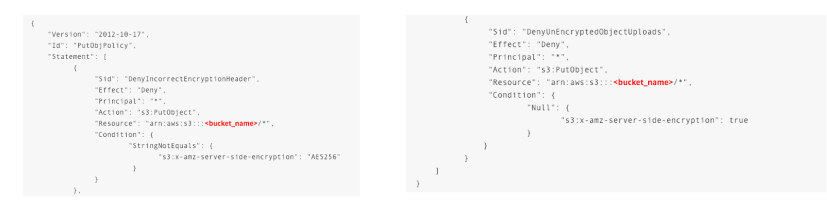
- One way to “force encryption” is to use bucket policy and refuse any API call to PUT an S3 object without encryption headers:
- Another way is to use the “default encryption” option in S3
- Note: Bucket Policies are evaluated before “default encrytion”
S3 Access Logs
- For audit purpose, you may want to log all access to S3 buckets
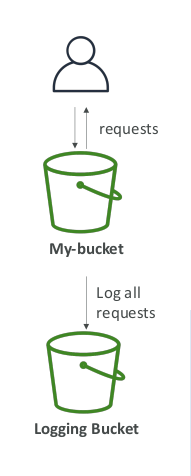
- Any request made to S3, from any account, authorized or denied, will be logged into another S3 bucket
- That data can be analyzed using data analysis tools…
- Or Amazon Athena as we’ll see later in this section!
- The log format is at:
https://docs.aws.amazon.com/AmazonS3/latest/dev/LogFormat.html
S3 Access Logs: Warning
- Do not set your logging bucket to be the monitored bucket
- It will create a logging loop, and your bucket

S3 Replication (CRR & SRR)
- Must enable versioning in source and destination
- Cross Region Replication (CRR)
- Same Region Replication (SRR)
- Buckets can be in different accounts
- Copying is asynchronous
- Must give proper IAM permissions to S3
- CRR - Use cases: compliance, lower latency access, replication across accounts
- SRR - Use cases: log aggregation, live replication between production and test accounts
S3 Replication - Notes
- After activating, only new objects are replicated
- Optionally you can replicate existing object using S3 Batch Replication
- Replicates existing objects and objects that failed replication
- For Delete operations:
- Can replicate delete markers from source to target (optional setting)
- Deletions with a version ID are not replicated (to avoid malicious deletes)
- There is no “chaining” of replication
- If bucket I has replication into bucket 2, which has replication into bucket 3
- The objects created in bucket I are not replicated to bucket 3
S3 Pre-Signed URLs
- Can generate pre-signed URLs using SDK or CLI
- For downloads (easy, can use the CLI)
- For uploads (harder, must use the SDK)
- Valid for a default of 3600 seconds, can change timeout with –expires-in [TIME_BY_SECONDS] argument
- Users given a pre-signed URL inherit the permissions of the person who generated the URL for GET / PUT
- Examples:
- Allow only logged-in users to download a premium video on your S3 bucket
- Allow an ever changing list of users to download files by generating URLs dynamically
- Allow temporarily a user to upload a file to a precise location in our bucket
© Stephane Maarek
S3 Storage Classes
- Amazon S3 Standard - General Purpose
- Amazon S3 Standard-Infrequent Access (IA)
- Amazon S3 One Zone-Infrequent Access
- Amazon S3 Glacier Instant Retrieval
- Amazon S3 Glacier Flexible Retrieval
- Amazon S3 Glacier Deep Archive
- Amazon S3 Intelligent Tiering
- Can move between classes manually or using S3 Lifecycle configurations
S3 Durability and Availability
- Durability
-
High durability (99.99999999%, 9’s) of objects across multiple AZ - If you store 10000000 objects with Amazone S3, you can on average expect to incur a loss of a single object once every 10000 years
- Same for all storage classes
-
- Availability
- Measures how readily available a service is
- Varies depending on storage class
- Example S3 standard has 99.99% availability = not available 53 minutes a year
S3 Standard – General Purpose
- 99,99% Availability
- Used for frequentlly accessed data
- Low latency and high throughput
- Sustain 2 concurent facility failures
- Use Cases: Big Data analytics, mobile & gaming applications, content distribution…
S3 Storage Classes – Infrequent Access
- For data that is less frequently accessed, but requires rapid access when needed
- Lower cost than S3 standard
- Amazon S3 standard-infrequent Access (S3 standard-IA)
- 99.99% availability
- Use cases: Disater recovery, backups
- Amazon S3 One Zone-Infrequent Access (S3 One Zone-IA)
- High durability (99.999999%) in a single AZ; data lost when AZ is destroyed
- 99.5 Availability
- Use Cases: Storing secondary backup copies of on-premises data, or data you can recreate
Amazon S3 Glacier Storage Classes
- Low cost object storage meant for archiving / backup
- Pricing: price for storage + object retrieval cost
- Amazon S3 Glacier Instant Retrieval
- Milisecond retrieval, great for data accessed once a quarter
- Minimum storage duration of 90 days
- Amazon S3 Glacier Flexible Retrieval (formerly Amazon S3 Glacier)
- Expedited (1 to 5 minutes), Standard (3 to 5 hours), Bulk (5 to 12 hours) – free
- Minimum storage duration of 90 days
- Amazon S3 Glacier Deep Archive – for long term storage
- Standard (12 hours), Bulk (48 hours)
- Minimum storage duration of 180 days
S3 Intelligent-Tiering
- Small monthly monitoring and auto-tiering fee
- Moves objects automatically between Access Tier based on usage
- There are no retrieval charges in S3 Intelligent-Tiering
- Frequent Access tier (automatic): default tier
- Infrequent Access tier (automatic): objects not accessed for 30 days
- Archive Access tier (optional): configurable from 90 days to 700+ days
- Deep Archive Access tier (optional): config. from 180 days to 700+ days
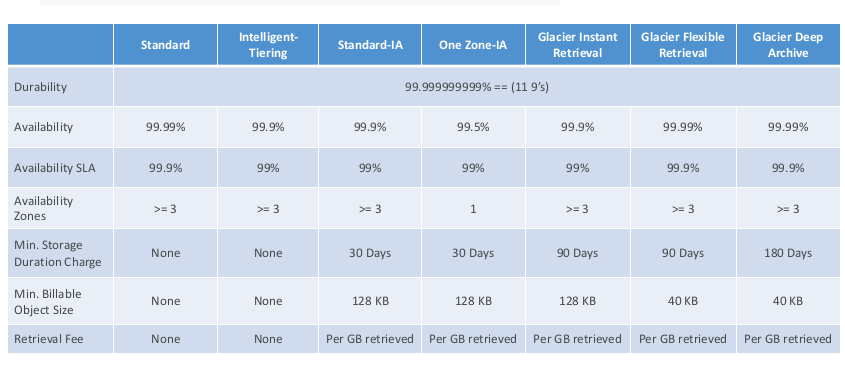
S3 Storage Classes Comparison
S3 – Moving between storage classes
- You can transition objects between storage classes
- For infrequently accessed object, move them to STANDARD_IA
- For archive objects you don’t need in real time, GLACIER or DEEP-ARCHIVE
- moving objects can be automated using a lifecycle configuration
S3 Lifecycle rules
- Transition actions: it defines when objects are transitioned to another storage class
- Move objects to Standard IA class 60 days after creation
- Move to Glacier for archiving after 6 months
- Expiration actions: configure oobjects to expire (delete) after some time
- Access log files can be set to delete after a 365 days
- Can be used to delete old versions of files (if versioning is enabled)
- Can be used to delete incomplete multi-part uploads
- Rules can be created for a certain prefix (ex - s3://mybucket/mp3/*)
- Rules can be created for a certain object tags (ex - Department Finance)
S3 Lifecycle Rules – Scenario 1
- Your application on Ec2 creates images thumbnails after profile photos are uploaded to Amazon S3. These thumbnails can be easily recreated, and only need to be kept for 45 days. The source images should be able to be immediately retrieved for these 45 days, and afterwards, the user can wait up to 6 hours. How would you design this?
- S3 source images can be on STANDARD, with a lifecycle configuration to expire them (delete them) after 45 days.
S3 Lifecycle Rules – Scenario 2
- A rule in your company states that you should be able to recover your deleted S3 objects immediately for 15 days, although this may happen rarely. After this time, and for up to 365 days, deleted objects should be recoverable withn 48 hours.
- You need to enable S3 versioning in order to have object versions, so that “deleted objects” are in fact hidden by a “delete marker” and can be recovered
- You can transition these “noncurrent versions” of the object to S3_IA
- You can transition afterwards these “noncurrent versions” to DEEP_ARCHIVE
S3 Analytics – Storage Class Analysis
- You can setup S3 analytics to help determine when to transition objects from standard to standard_IA
- Does not work for ONEZONE_IA or GLACIER
- Report is updated daily
- Takes about 24h to 48h hours to first start
- Good first step to put together lifecycle rules (or improve them)!
S3 Baseline performance
- Amazon S3 automatically scales to high request rates, latency 100-200ms
- Your application can achieve at least 3500 PUT/COPY/POST/DELETE and 5500 GET/HEAD requests per second per prefix in a bucket.
- There are no limits to the number of prefixes in a bucket.
- Example (object path => prefix):
- bucket/folder1/sub1/file => /folder1/sub1/
- bucket/folder1/sub2/file => /folder1/sub2/
- bucket/1/file => /1/
- bucket/2/file => /2/
- If you spread reads across all four prefixes evenly, you can achieve 22000 requests per second for GET and HEAD
S3 – KMS Limitation
- If you use SSE-KMS, you may be impacted by the KMS limits
- When you upload, it call the GenerateDataKey KMS API
- When you download, it call the Decrypt KMS API
- Count towards the KMS qouta per second (5500, 10000. 30000 req/s based on region)
- You can request a qouta increase using Service Qoutas Console
S3 Performance
- Multi-part upload
- recommended for files > 100MB, must use for files > 5GB
- Can help parallelize uploads (speed up transfers)
- S3 Transfer Acceleration
- Increase transfer speed by transferring file to an AWS edge location which will forward the data to the S3 bucket in the target region.
- Compatible with multi-part upload
S3 Performance - S3 Byte Range Fetches
- Parallelize GETs by requesting specific byte ranges
- Better resilience in case of failures
- Can be used to speed up downloads
- Can be used to retrieve only partial data (for example the head of a file)
S3 Select & Glacier Select
- Retrieve less data using SQL by performing server side filtering
- Can filter by rows & columns (simple SQL statements)
- Less network transfer, less CPU cost client-side